Google Shopping agency or AI optimisation. What pays off for shops?
Christian Beeking
Co-Founder, Cloudginny
October 28, 202620 min read
Last updated: October 28, 2026.
If you search for a Google Shopping agency, you mostly find agencies, and many of them advertise up to 20 percent lower click costs right at the top. What the management costs in total once a feed tool and a CSS are added is rarely stated alongside, and hardly any of these texts mention that there is now a third option besides an agency and doing it yourself. Whether an agency or a tool pays off in general is answered with open numbers in our comparison Google Ads agency vs. tools. This article covers what Shopping adds on top, namely the product feed, Merchant Center and CSS, and the question of when an AI is enough for this work.
Is a Google Shopping agency worth it for your shop?
In short
For most online shops, no. A Google Shopping agency only pays off from around $7,500 to $10,000 in monthly ad spend. At a $3,000 budget, management, feed tool and CSS fee together cost 17 to 39 percent of what you spend on clicks.
Agencies understandably set the threshold lower. Current agency guides name $1,500 to $3,000 in monthly budget as the entry point, and one gives the rule of thumb that the ad budget should be at least one and a half times the fee. Read the other way round, the fee may then be two thirds of the budget. In the German sellerforum, it sounds different: “Really good agencies expect a certain, usually five-figure ad budget,” one user writes there.
How far many shops are from that is shown by our customer accounts from the DACH region: the median ad budget there is a little over €700 a month, and three quarters of the accounts stay below €1,800. For a shop with a €700 budget, even a slimmed-down agency retainer from €300 would cost almost half of the ad budget.
A small retainer at a typical budget
€300slimmed-down agency retainer per month
÷
€700median ad budget in our customer accounts
=
43%of the ad budget goes to the agency
Three quarters of our customer accounts in the DACH region stay below €1,800 in monthly ad spend.
A quick self-test shows whether your shop is one of the exceptions:
Self-test: agency or AI?
Question
Points to an agency
Points to an AI
How high is your monthly ad budget?
over $7,500
under $7,500
In how many countries do you advertise with Shopping?
several, with their own feeds and languages
one market or a few countries with the same feed
Which channels should be managed together?
Google, Meta and marketplaces with one shared strategy
mainly Google, possibly Microsoft
What state is your feed in?
fundamentally broken, whole categories disapproved (then often as a one-off project)
in place, with individual errors
Does someone on the team have a few minutes a day for approvals?
no
yes
Who should decide what happens to the budget?
the agency
you
The threshold follows from agency prices themselves. From around $7,500 in budget, an $800 entry fee for active management plus feed tool and CSS comes to roughly 11 to 13 percent of the budget, which is the range agencies charge themselves on a percentage model. With the same fee, it would be 27 to 32 percent at a $3,000 budget. Whether the agency pays off from $7,500 then depends on complexity: several countries, several channels, a team that needs managing.
Where the $7,500 threshold comes from
At a $7,500 ad budget
$820 to $960$800 fee plus feed tool and CSS
÷
$7,500monthly ad budget
=
11 to 13%as much as agencies charge on a percentage model
At a $3,000 ad budget
$820 to $960the same costs
÷
$3,000monthly ad budget
=
27 to 32%of the budget goes to management
Feed tool $0 to $60, CSS $20 to $100 a month. Agencies on a percentage model charge 8 to 15 percent of the budget.
What does a Shopping agency actually do?
A Shopping agency takes over the parts that plain search campaign management doesn't cover: the product feed, Merchant Center, the connection to a CSS and a campaign structure built around products. When people talk about Google Shopping management, this package is usually what they mean.
Product feedTitles, GTINs, categories, custom labels and rules for weak items
Merchant CenterAccount, domain, shipping and returns, disapproved products
CSSRegistration with a comparison service, often the agency’s own or a partner’s
CampaignsSplit by margin, Performance Max or Standard Shopping, bid targets, exclusions
On the feed side, it's about product titles that contain the brand, product type and the attribute people search for, complete GTINs, matching product categories, custom labels for margin or bestsellers, and rules that take weak items out of advertising. In Shopping, the feed plays the role that keywords play in search ads: it decides which search queries a product can appear for at all. In Merchant Center, the agency sets up the account, verifies the domain, adds shipping and returns, and deals with disapproved products before warnings turn into an account suspension.
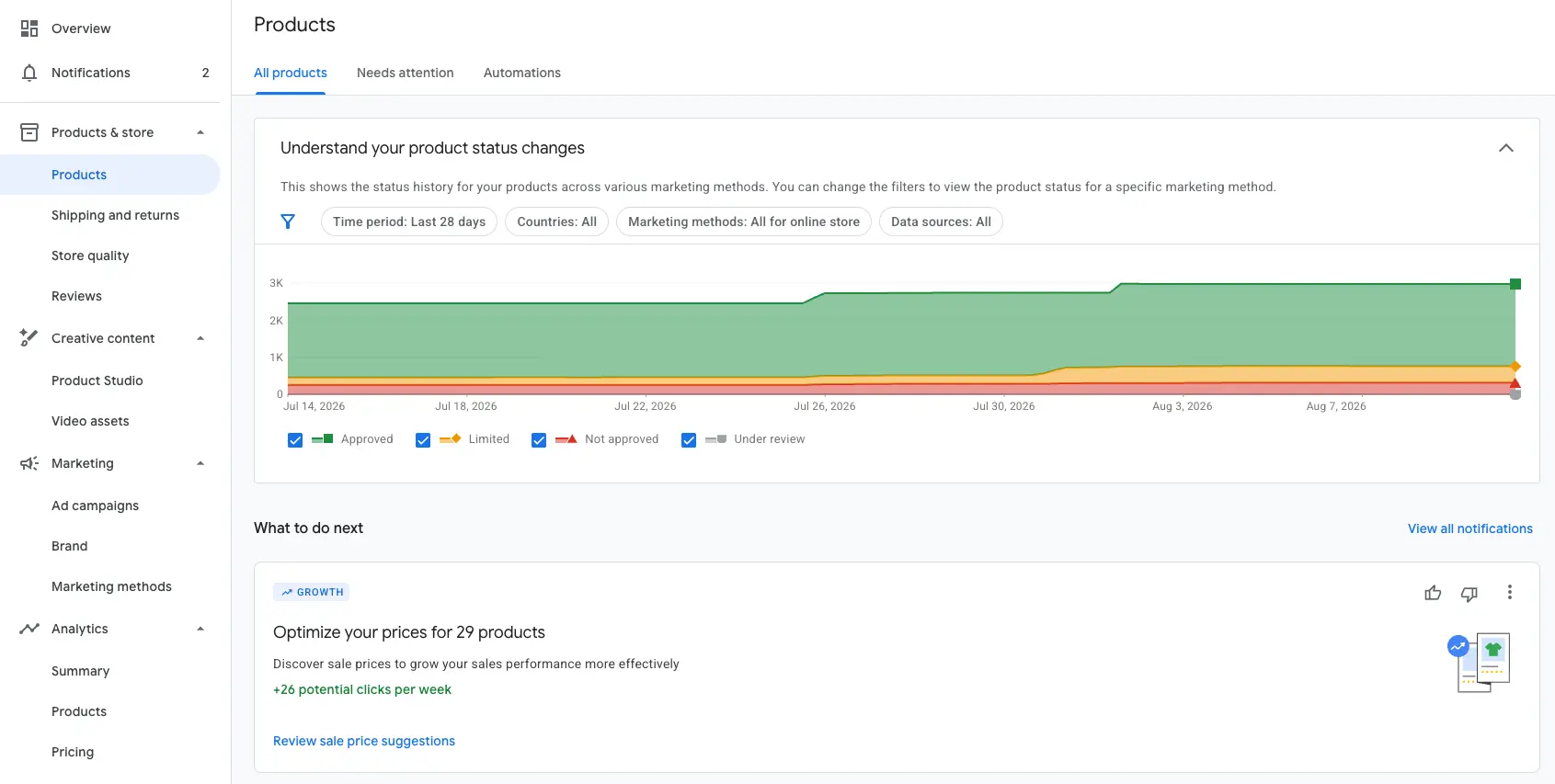
In Merchant Center, you can see how many products Google has approved, limited or not approved. This is where the quality of your feed shows. Screenshot: Google Merchant Center
For the CSS, it registers your Merchant Center with a comparison shopping service, often its own or a partner's. And for the campaigns, it's about splitting by margin, bestsellers and slow sellers, the choice between Performance Max and Standard Shopping, bid targets that match the margin, and exclusions for search terms that never sell.
This work comes in two very different rhythms. Building the feed, setting up Merchant Center and connecting a CSS are one-off projects. Fixing disapprovals, excluding search terms and shifting budgets is routine that comes back every week. Both can be bought separately, and that is where the real savings lie.
One-off project
Build the feed
Set up Merchant Center
Connect a CSS
Routine, every week
Fix disapprovals
Exclude search terms
Shift budgets
You can have the feed built once by a freelancer or an agency and then take over maintenance yourself or with an AI. If your main problem is disapproved products, we offer a feed check at a fixed price of $249: within 48 hours of getting access to your account, you receive the findings on what is causing the disapprovals. If you like, we implement the fix as part of a feed audit.
What does a Shopping agency really cost?
According to the industry's price overviews, a Shopping agency usually costs $800 to $4,000 a month or 8 to 15 percent of the ad budget. Shopping adds items that easily get lost in offers: the feed tool, the CSS fee and a one-off setup of $500 to $5,000. Without the setup, the running costs add up to 17 to 39 percent of the ad budget at a $3,000 monthly budget, and to 10 to 18 percent at $15,000.
What a Shopping agency costs per month
Cost item
At a $3,000 monthly budget
At a $15,000 monthly budget
Agency fee per month
$500 to $1,000
$1,500 to $2,500
Feed tool per month
$0 with an export from your shop system, otherwise about $20 to $60 for small catalogues
$0 to about $60, more for large catalogues
CSS fee per month
about $20 to $100
about $20 to $100, more with percentage models
Running total per month
about $520 to $1,160 (17 to 39% of the budget)
about $1,520 to $2,660 (10 to 18%)
Setup, one-off
$500 to $5,000
$500 to $5,000
For comparison: AI agent Cloudginny, with feed tool and CSS
about $370 to $510 (12 to 17%)
about $720 to $860 (5 to 6%)
Agency fees according to the industry's price overviews, as in our article on agencies vs. tools. Setup from $500 for simple accounts up to $5,000, as one Shopping agency quotes for a build including the feed. CSS and feed tool prices from providers' public price lists, as of October 2026. Cloudginny according to our price list, net, with no setup fee.
The easiest place to save is the feed tool. Shopify, Shopware, JTL and WooCommerce each come with a free way into Merchant Center, in Shopware for example the Product comparison sales channel, which we describe step by step in our Shopware guide. A paid tool only pays off with many channels, several countries or complex rules for titles and labels. If the tool runs on the agency's licence, however, it doesn't belong to you, and the feed ends with the contract.
With the fee, it's worth looking at the billing model. Many agencies charge a percentage of the ad budget. The catch is the incentive: the agency earns more when you spend more, even if the extra clicks bring no profit. One Shopping agency even writes on its own website that it considers this model unfair and charges a fixed monthly price of $400 to $1,500 instead. And the setup usually comes up again when you switch agencies, which belongs in the calculation too.
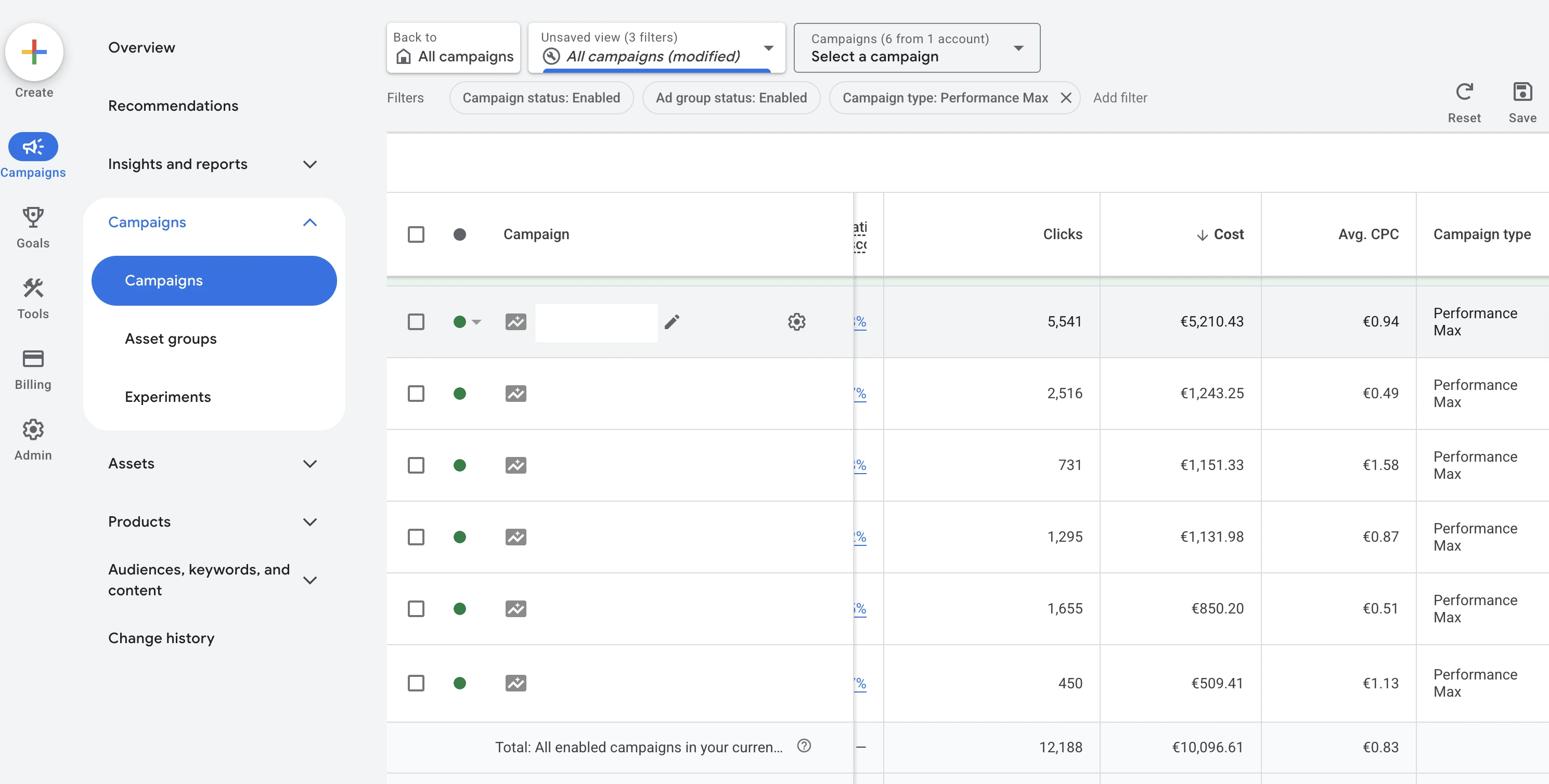
What you pay Google is in the Cost column in Google Ads. On a percentage model, the agency fee rises with exactly this number, whether the clicks are profitable or not. Screenshot: Google Ads
What is a CSS, and does it really save 20%?
Explained briefly
A CSS, short for Comparison Shopping Service, is a comparison service approved by Google that places Shopping ads on behalf of merchants. In Germany, Austria and Switzerland, every Shopping ad runs through such a service, by default through Google's own service, Google Shopping. Google doesn't say whether another CSS really saves 20 percent.
The background is the European Commission's antitrust decision of 2017, under which Google may not favour its own comparison shopping. Since then, Google Shopping has appeared in Shopping ads as one comparison service among many. The difference lies in the margin: according to Google's help page on comparison shopping services, Google Shopping deducts a fixed margin from every merchant bid, and this margin is included in the click price you pay. Other CSS providers usually do without this deduction and charge their own fee instead, often as a monthly flat rate, sometimes as a mark-up on the click price. Your bid then counts in full in the auction, and you get a better position for the same amount or the same position for less money.
Where the margin sits
Via Google Shopping
Your bidwhat you offer per click
Margin deductedGoogle doesn’t publish the amount
Bid in the auctionlower than your bid
Via another CSS
Your bidwhat you offer per click
No deductionusually, but a fee of its own
Bid in the auctioncounts in full
Based on Google’s help page on comparison shopping services. The other CSS’s fee comes on top, as a monthly flat rate or a mark-up on the click price.
Google doesn't publish how high Google Shopping's margin is. The 20 percent comes from material by agencies and CSS providers, and Google's AI Overview now repeats the figure. Even there it usually says “up to”, and an agency with its own CSS writes in its guide that the advantage shrinks the more merchants switch. So calculate cautiously: with 10 percent actual savings and a $50 fee, a CSS pays for itself from about $500 in monthly Shopping spend. Below that, it costs more than it saves. The savings also apply only to Shopping ads, search ads don't benefit.
When a CSS pays for itself
$500Shopping budget per month
×
10%cautiously estimated saving
=
$50as much as the monthly fee
Below that, the CSS costs more than it saves. Search ads don’t get any saving.
For the agency question, the most important point is a different one: a CSS is not an agency product. CSS providers take on merchants directly, Google explicitly allows advertising with several CSSs at the same time, and according to the providers, the feed and campaigns stay unchanged when you switch. If an agency justifies its price with CSS savings, it's selling you something you can get without it for a monthly flat fee.
Since mid-September 2026, the topic carries extra weight in the European Economic Area. Google has removed free product listings and product carousels from search there, so in Germany and Austria too, as etailment and others report, as a result of a European Commission decision under the Digital Markets Act. The change doesn't apply in Switzerland. What mainly remains visible are the paid Shopping ads. Visibility with product image and price in search now depends mainly on ads that run through a CSS. The space that has opened up goes to a new block for comparison services. Only services approved by Google with their own product pages appear there, and Google doesn't disclose how it ranks them. So a CSS contract doesn't automatically get your products in. Anyone who advertises with it should be able to show that their CSS actually appears there for your most important search queries.
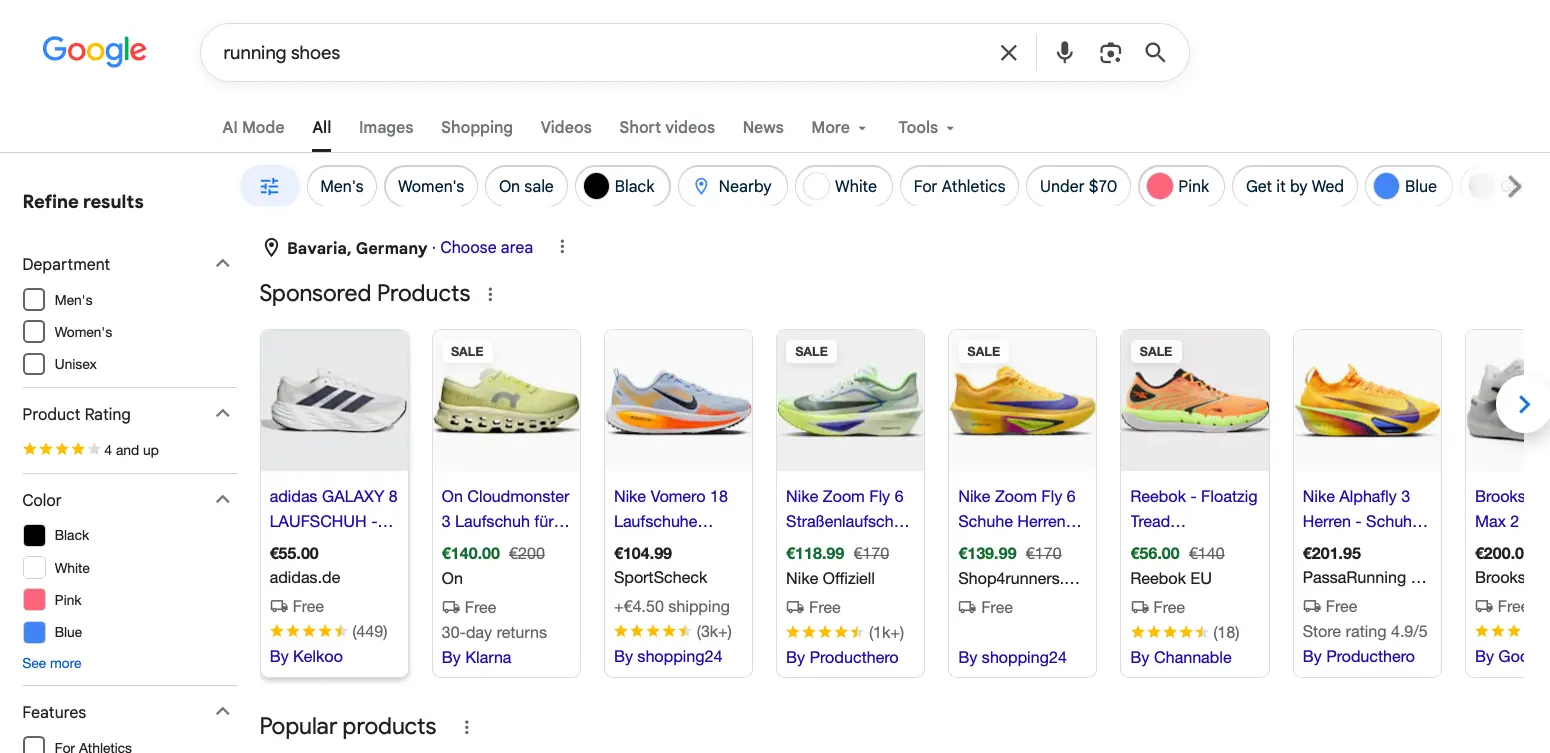
This is what paid Shopping ads look like in search. Under each one, you can see which CSS it runs through. Screenshot: Google Search
How do you spot a bad offer?
A weak offer for Google Shopping gives itself away through outdated terms, savings without a price tag and accounts that end up belonging to the agency. Conversely, you recognise a good offer by the agency asking about your feed, margins and bestsellers first, listing the CSS costs separately, setting up all accounts in your name and reporting on revenue and contribution margin per product group instead of clicks.
How to recognise a good offer
The agency asks about your feed, margins and bestsellers first.
The CSS costs are listed separately in the offer.
All accounts are set up in your name.
Reporting covers revenue and contribution margin per product group, not clicks.
Smart Shopping in the scope of services
According to the Google blog, Google automatically moved Smart Shopping campaigns to Performance Max between July and the end of September 2022, so the campaign type hasn't existed for four years. Anyone still offering it today hasn't revised their offer since, and that says something about how up to date the rest is.
“Save 20 percent” without a price for the CSS
The saving is an upper limit that Google doesn't confirm, and the CSS costs money. Ask what the CSS costs per month, whether the fee is included in the agency fee and whose name the contract is in.
Keyword bidding for Shopping
Shopping campaigns have no keywords. Google matches products to search queries through the feed data, bids are placed on products and product groups, and search terms can only be excluded. An offer with keyword research and keyword bidding for Shopping is a template from the search ads business.
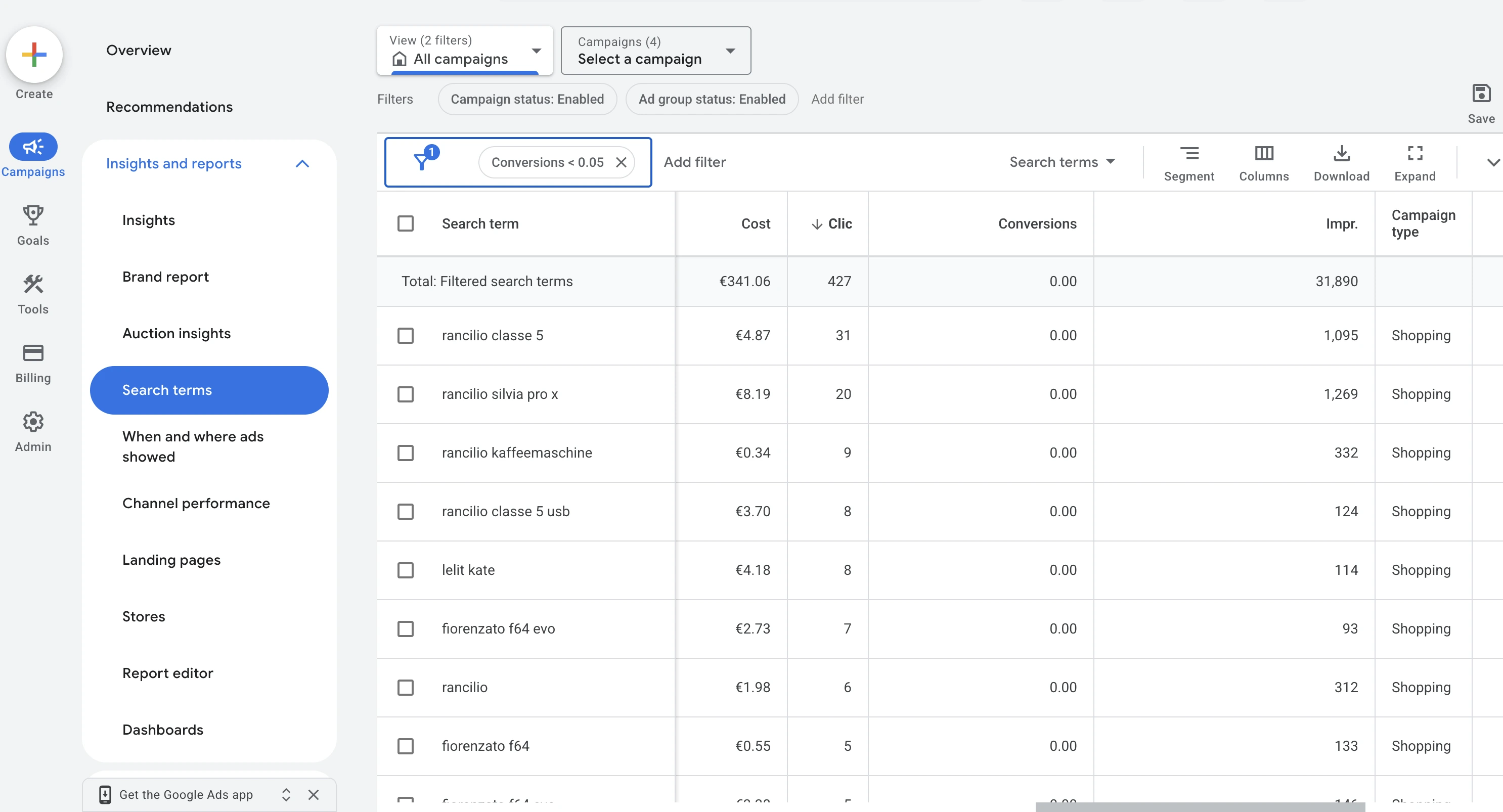
Only the search terms report shows which queries your Shopping ads appeared for. Filtered to terms without a conversion: 427 clicks and €341.06 in four weeks. You can’t bid on these terms, only exclude them. Screenshot: Google Ads
Accounts with the agency's CSS without your own access
Your Google Ads account, Merchant Center and feed tool should belong to you, with your own administrator access and your own payment method. Merchant Center is the most critical: if you advertise through an agency's CSS, it often sits as a sub-account in the agency's multi-client account. According to Google, such a sub-account can't simply be detached, and a switch runs through an account migration that an administrator of the Merchant Center has to approve. Without this access, you depend on the old agency's cooperation when you switch.
How a switch out of an agency’s multi-client account works
Requestsubmitted by the new CSS in CSS Center
Approvalby an administrator of your Merchant Center
Up to 14 daystransition period, which the old CSS can shorten
Based on Google’s help page on account migration in CSS Center. Without administrator access, you depend on the old agency’s cooperation.
If you want to review an existing account yourself before hiring anyone, you'll find the key points in our Google Ads audit with checklist.
When is an AI enough instead of an agency?
An AI is enough once the feed is set up cleanly and only ongoing maintenance is left: fixing disapprovals, excluding search terms without orders, shifting budgets and checking which products get impressions at all. That's the work that comes back every week, and the part an agency is paid for month after month.
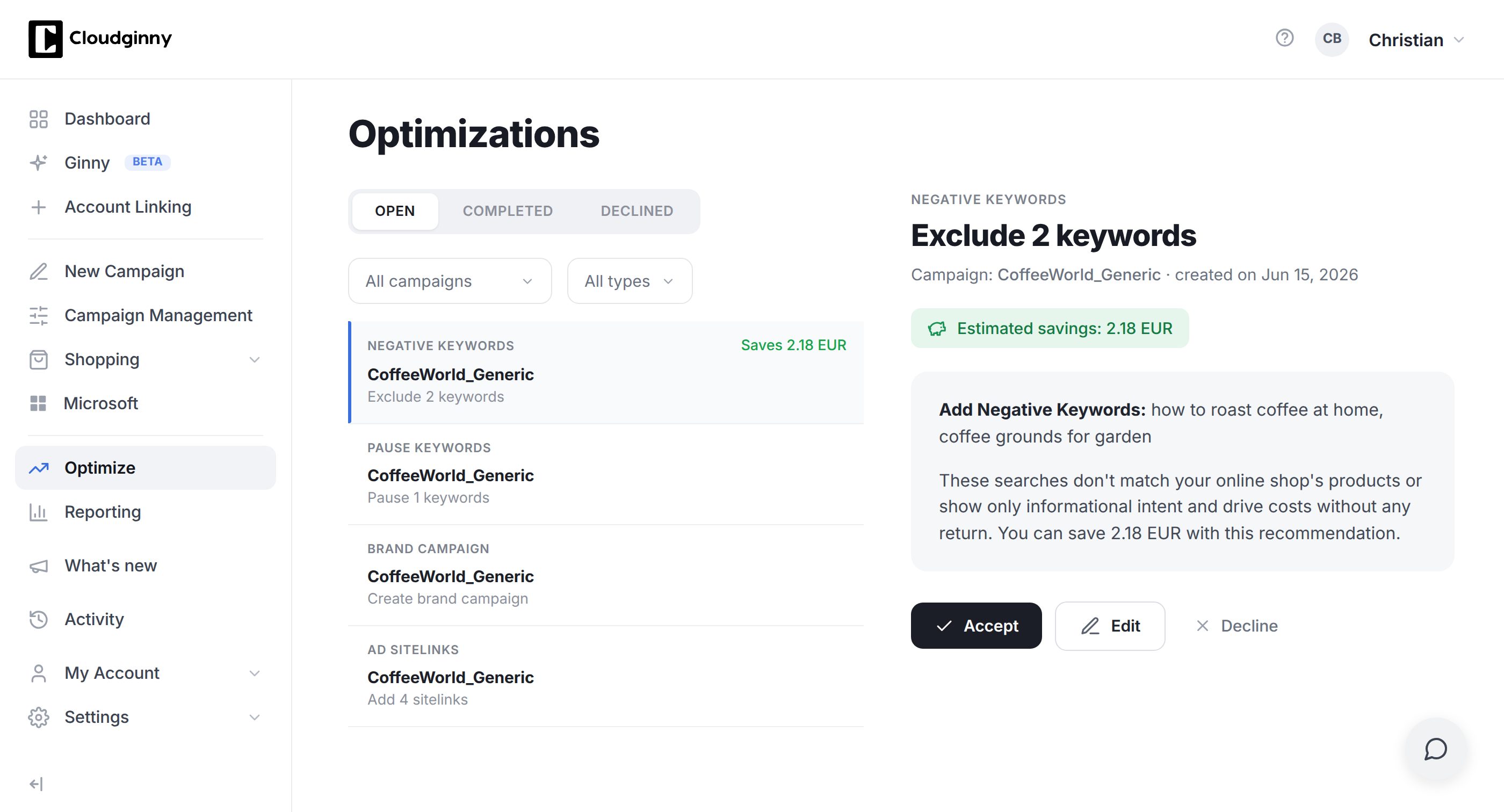
This is what the routine looks like with Ginny: a suggestion with a rationale and estimated savings. Nothing changes until you click “Accept”. Screenshot: Cloudginny
For most shops, the sensible split therefore looks like this: set up the feed cleanly once, yourself, with a freelancer or with the help of our feed check, and then hand the routine over to an AI. This is the part Ginny takes over, our AI agent for Google Ads for e-commerce shops in Germany. Every day she checks which products Merchant Center disapproves and why, which search terms cost money without selling, and which campaign is hitting its budget cap. She presents every change to you as a suggestion with a reason, you approve, she implements it, and nothing that costs money happens before your click. For JTL shops there is also a free plugin that sends your purchase prices to Cloudginny. They are turned into margin classes that Ginny uses to split Shopping campaigns.
Two JTL merchants show what this looks like. Nähplatz.de used to work with agencies. “At some point we hit the ceiling. There was no more growth,” says Christian Sattler. According to the case study How Nähplatz.de runs Google Ads without an agency, the shop saved €10,674 with Ginny compared with an agency or freelancer, and 345 hours of manual work were eliminated. Revenue via Google Ads from January to March was 25 percent above the previous year, with marketing costs below five percent of revenue. Markeking previously paid an agency €800 a month for its two shops and replaced the agency with Cloudginny. The case study From agency costs to AI efficiency shows a positive ROI from day one, a 63 percent higher click-through rate and 155 hours saved in two months.
Two JTL merchants after the agency
Nähplatz.de
€10,674saved compared with an agency or freelancer
345 hoursless manual work
+25%revenue via Google Ads, January to March
Markeking
€800agency fee per month, replaced by Cloudginny
+63%click-through rate
155 hourssaved in two months
Figures from the two case studies on cloudginny.com.
An AI doesn't replace an agency when the work goes beyond routine. That applies to a feed that has to be rebuilt for several countries and languages, to a strategy across Google, Meta and marketplaces, and to shops where nobody has time for approvals. Then a Shopping ads agency pays off, or a combination in which the agency does the project and the AI takes over maintenance afterwards. What Ginny costs at your budget is on the pricing page: $149 a month up to $2,499 in ad spend, $349 up to $7,499 and $699 up to $19,999, net and without a setup fee.
Hand the routine over to Ginny
Connect Google Ads and Merchant Center. Every day, Ginny suggests what’s worth doing and only implements what you approve.
Frequently asked questions about Google Shopping agencies
What does a Google Shopping agency cost?
For ongoing management, agencies usually charge a fixed monthly price of $800 to $4,000, depending on scope and budget, or 8 to 15 percent of the ad budget. Smaller packages with a few hours of work start at around $300 to $500. On top of that comes a one-off setup of $500 to $5,000. Specific to Shopping, there's a feed tool from about $20 and a CSS fee of about $20 to $100 a month, unless both are included in the fee.
What is the difference between a Google Shopping agency and a Google Ads agency?
A Google Ads agency mainly manages search campaigns with keywords, ad copy and bids. A Shopping agency also takes care of the product feed, Merchant Center and CSS, because Shopping ads work without keywords and Google matches products through the feed data. Many agencies offer both. You can recognise good Shopping management by the fact that it asks about your feed first.
Can I use a CSS without an agency?
Yes. CSS providers take on merchants directly, usually for a flat fee of about $20 to $50 a month per shop, up to about $100 with support, and Google allows advertising with several CSSs at the same time. Whether it pays off depends on the Shopping budget: with a cautious 10 percent saving and a $50 fee, a CSS pays for itself from about $500 a month.
Can I switch agencies without losing my feed and data?
Yes, if the accounts belong to you. The Google Ads account with its campaign history stays with you if you are the administrator there and the payment method is in your name. You keep the feed if it comes from your shop system or sits in a feed tool in your name, while rules in the agency's tool end with the contract. If your Merchant Center hangs as a sub-account in the agency's CSS multi-client account, the switch runs through an account migration in CSS Center: the new CSS submits the request, an administrator of your Merchant Center approves it, and a transition period of up to 14 days follows. So before you cancel, check that you have administrator access everywhere.
Do I need a feed tool for Google Shopping?
Not to get started. Shopify, Shopware, JTL and WooCommerce each come with a free way to get the feed into Merchant Center. A feed tool pays off if you need several countries, several channels or complex rules for titles and labels, and for small catalogues prices start at around $20 to $60 a month.
Is Google Shopping worth it for small shops without an agency?
Yes, as long as the margin covers the ad costs. Using the median click price and the median conversion rate of our customer accounts, an order via Google Ads costs about €22 in ad spend. If your contribution margin per order is higher than that, Shopping can pay off even with a small budget, and without an agency the maintenance costs either your time or, with an AI, a few minutes a day for approvals. The full calculation is in our guide Google Ads costs. What your shop needs technically for Shopping is explained in the guide Google Shopping for retailers.
Christian Beeking is co‑founder of Cloudginny, the AI agent for automating Google Ads in e‑commerce. Before Cloudginny, the team managed more than 100 million euros in Google Ads budget for brands such as MediaMarkt, Cisco and Bose, and has now poured that knowledge into Ginny. Cloudginny is an official Google Partner, a WebStollen partner and part of the German Accelerator.
In December, every delivery promise counts, and Google calculates the delivery date for Shopping from your data. Because Google counts Christmas Eve and New Year's Eve as normal business days, it easily produces dates no carrier can keep. This article covers the 2026 shipping deadlines, how Google calculates the delivery date and what to change in Merchant Center through January.
For most online shops, Google Ads is the first paid channel. Yet the usual explanations only say what Google Ads is, not what a click really costs or where beginners lose money. This article explains the auction, the ad types that matter, the role of Merchant Center and the costs, with real figures from merchant accounts and the five most expensive mistakes to avoid at the start.
Shopware 6 has everything you need for Google Shopping, but nobody explains it in one piece. The docs cover the product comparison, plugin pages sell extensions, and the forum is missing half the tracking setup. This guide walks you through the whole route: linking the accounts, a feed without a plugin using a Twig template to copy, conversion tracking from Shopware 6.7, a Standard Shopping start and weekly upkeep.