
Whether it’s search ads, Shopping or Performance Max in Google Ads: you say in one sentence what you want to advertise, and Ginny, your AI agent in Cloudginny, builds the draft. Have anything you don’t like changed. The campaign only goes live after your approval.
Sure. I’ve gone through your product feed and built a draft:
Take a look at the draft in the preview. I’ll change anything you don’t like before anything goes live. Want me to set it up like this? Reply Yes or No.
Ginny can make mistakes. Nothing is carried out until you approve.



Setting up a campaign in Google Ads means: pick a campaign type, create ad groups, research keywords, write ad copy, set up assets, set bids, assign products. A good dozen decisions before the first ad even runs.
That’s why many shops are stuck with the one campaign someone set up two years ago. With Cloudginny you describe your goal instead, and Ginny builds the rest. You read over it and approve.
You describe in the chat what you want to advertise and with what daily budget. One sentence is enough; Ginny asks for the rest if anything is missing.
Ginny builds the complete draft and shows it to you as a preview. Ad copy, keywords, products: read through it all in peace and have anything you don’t like changed.
Only your yes creates the campaign in your Google‑Ads account. Until then, not a cent has been spent and nothing has changed.
Three types, one flow. Which one fits depends on what you sell and how much you want to steer yourself.
Your ad above the search results, when someone searches for exactly what you sell. Ginny reads your website, writes ad copy, suggests keywords and sets up the assets.
See search campaignsYour products with an image and a price on Google Shopping, and you decide exactly which. A campaign for just one brand, or just your high‑margin items.
See Standard ShoppingYour products shown more broadly, from your Merchant‑Center feed. Less manual work, but Google takes over more of the steering.
See Performance MaxYou don’t have to prepare anything. Ginny works with what you already have.
For search campaigns Ginny reads your pages and turns them into ad copy, keyword suggestions and assets. No briefing, no text document, no keyword research in Excel.
For Shopping and Performance Max, products, images and prices come from your Merchant Center. You say which products or which brand to advertise, and Ginny pulls the rest herself.
No draft disappears into a black box. You read what Ginny built, have it changed or approve it.
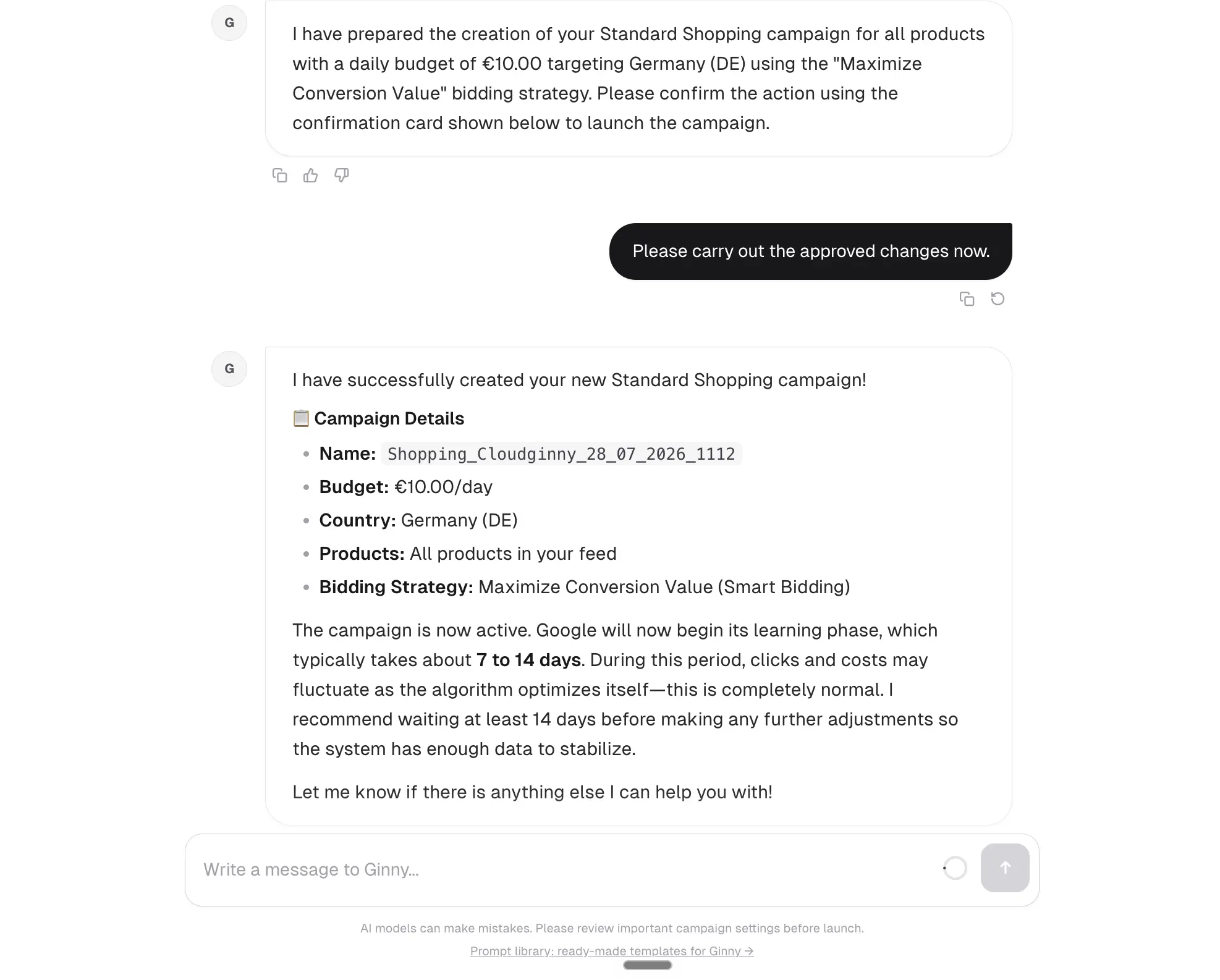
Only your yes creates the campaign.
“Cloudginny is the ideal replacement for an in‑house SEA manager. For our launch in the German market it was a real win. The first campaign was live in minutes.”
Florian Heuberger, Director Growth Marketing & E‑Commerce EU · Aventon E‑Bikes
Try Cloudginny for free, or book a free audit. We’ll look at your account and show you which campaign you’re missing.
AI agent for Google Ads in e-commerce
© 2026 Cloudginny. All rights reserved.
