
Google constantly disapproves products in Merchant Center, often without you noticing, and a disapproved product sells nothing. Cloudginny watches your Merchant Center automatically and speaks up the moment something gets disapproved. Ginny then explains why in plain language and walks the fix through with you.
Hi Markus! Google has currently disapproved 89 products in your Merchant Center. 86 of them for the same reason: “Landing page not reachable”.
This looks a lot like one feed error, not 89 separate problems. Fix this single cause and most products come back at once.
Want me to explain what “Landing page not reachable” means and how to fix it for your shop?
The status “Landing page not reachable” (landing_page_error) means Googlebot hit an error when opening the URLs stored in your feed (attribute link).
Since this affects 86 products at once, there’s very likely a structural problem, not an isolated case. Let’s go through the three most common causes.
AI can make mistakes. Nothing is carried out before you approve.
When Google disapproves a product in Merchant Center, it disappears from Shopping. No impressions, no clicks, no sales. And because nothing points it out to you, it often stays unnoticed for weeks while revenue quietly slips away.
And when you do check Merchant Center yourself, a wall of cryptic error messages hits you, without making clear what to tackle first.
Cloudginny watches your Merchant Center in the background. The moment Google disapproves a product, you find out actively, without having to check yourself. No daily looking, no nasty surprise weeks later.
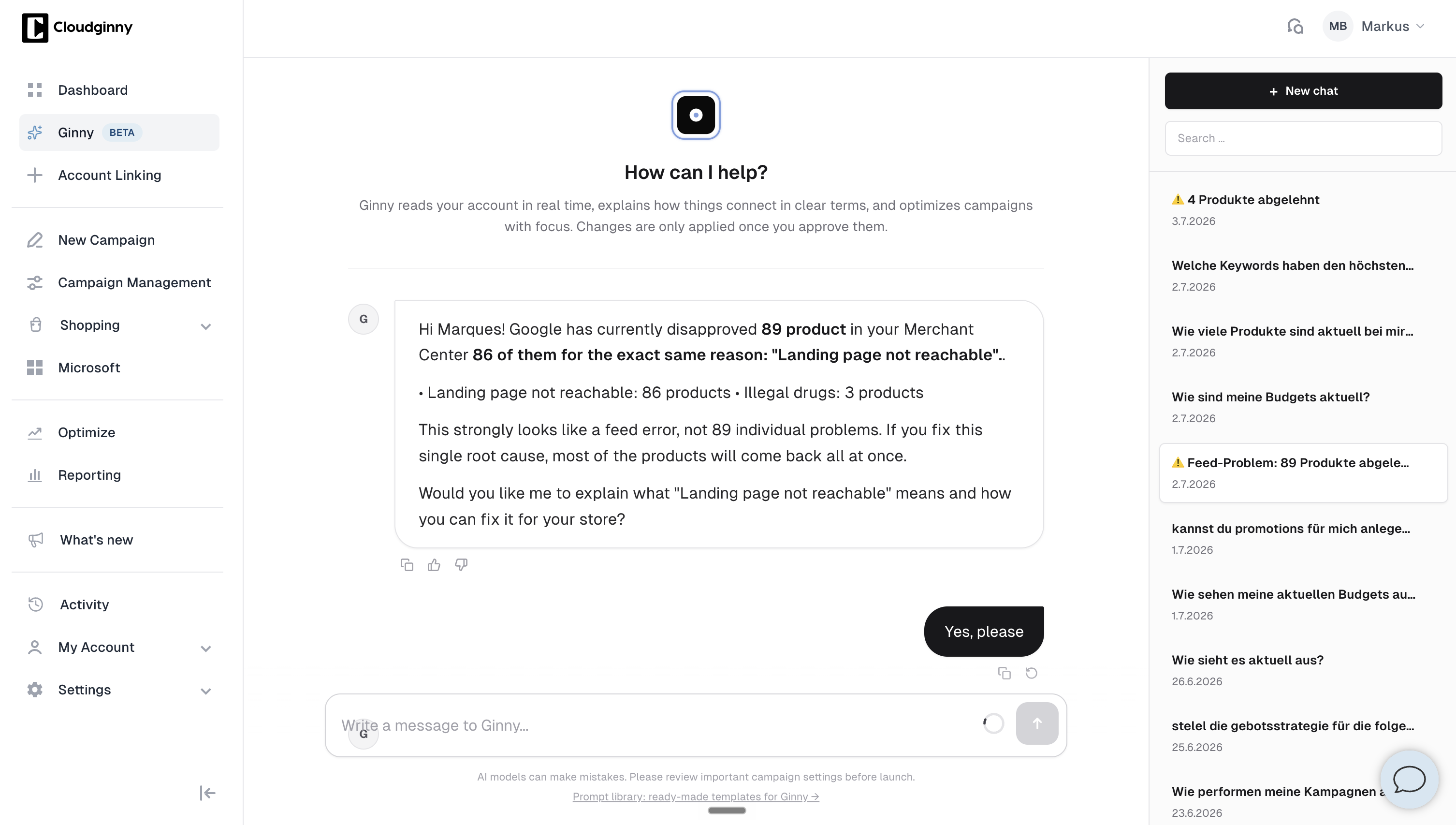
The prepared session, with the problem already worked up.
You’re not just informed, you land straight in the prepared fix. In three ways:
Instead of just telling you that something got disapproved, Ginny explains why in plain language, no jargon. And she offers to walk the fix through with you step by step, until the product runs again.
When many disapprovals share the same cause, Ginny spots it: one feed error, not 88 separate cases. She tells you clearly that most products come back at once as soon as you fix this single cause. That takes the fright out of it when half the list suddenly turns red.
If there are many disapprovals from several reasons, you don’t get an overwhelming product list. Ginny bundles them into a few systematic feed themes and goes through them with you one by one, the biggest first.
The reasons are grouped and shown with counts. And where Google gives no clear reason, Ginny honestly says “I’ll look at that one directly with you”, instead of throwing a cryptic “Unknown reason” at you that sounds like a defect.
As soon as products are approved again, Ginny reports it back positively, in the same chat session and as a green banner. For larger recoveries, a success mail comes on top. So you see not just the problem, but also that it got solved.
Cloudginny reports new and worsening problems, not the same error every day. Emails have a cooldown, and if you don’t react to an alert, you won’t keep getting pinged. That way an alert stays a real signal, not background noise.
No. Cloudginny watches your Merchant Center automatically and speaks up the moment Google disapproves something. You’re informed actively, instead of having to check yourself.
In three ways: through an automatically prepared Ginny chat, through a banner in the app with a direct click into exactly that session, and additionally by email with a button straight to the fix.
Yes, in addition to chat and in‑app banner. That way the alert reaches you even when you’re not in the app right now.
Instead of an overwhelming product list, Ginny bundles the disapprovals into a few systematic feed themes and goes through them with you one by one, the biggest first. If a single cause is behind them, Ginny tells you, so you fix it once and most products come back at once.
Google names three groups of causes: your product data doesn’t match what’s on your website, it doesn’t meet the product data specification, or the product violates the Shopping policies.
Typical messages are “Mismatched product price” and “Mismatched product availability” when feed and product page drift apart, “Product page unavailable” when Google can’t load the URL you supplied, and “Image too small”. On top of that come invalid identifiers such as a GTIN that doesn’t belong to the brand you stated, missing shipping costs, and policy cases.
What matters is the difference in levels: at product level there are warnings, where the product keeps running with limitations, and disapprovals, where it’s hidden across Google. At account level there are warnings and suspensions, which hit every product at once. In Cloudginny you see the plain‑language version, in Merchant Center the Google wording.
The number of disapproved products only drops for good once you fix the cause in your shop or ERP system. Whatever you patch by hand inside Merchant Center is usually gone again with the next feed upload.
Four things help most: have your feed read in at least daily, since products expire 30 days after the last update anyway; switch on Google’s automations for price, sale price, availability and condition, which bridge short‑lived mismatches but, as Google says, don’t replace a current feed; serve those same values as structured data on the product page as well; and let Googlebot, Googlebot‑image and AdsBot‑Google through in your robots.txt, on mobile as well as desktop.
After a feed fix, Google usually re‑evaluates data errors on its own within 24 to 72 hours, no request needed. You request a review mainly for policy and account issues, and that takes up to seven business days. All of this only works if someone notices when something slips. That’s exactly what Cloudginny watches your Merchant Center for. You still decide, Ginny only prepares.
No. Cloudginny reports new and worsening problems, not the same error every day. Emails have a cooldown, and if you don’t react to an alert, you won’t keep getting pinged.
Yes. As soon as products are live again, Ginny reports it back positively, in the same session and as a green banner. For larger recoveries, a success mail comes on top.
Try Cloudginny for free, or book a free audit. We’ll look at your account and your Merchant Center and show you where revenue is stalling right now.

AI agent for Google Ads in e-commerce
© 2026 Cloudginny. All rights reserved.

