
Ginny finds the search queries that burn your budget and bring in nothing, and excludes them after your approval. Your brand and everything that drives revenue stays untouched.
Done. These search terms cost money over the last 30 days but sold nothing:
That’s $55 a month together. I left out your brand and everything with sales. Should I exclude these three?
Ginny can make mistakes. Nothing is carried out until you approve.



On Google you pay per click, whether the click buys or not. If someone searches for “coffee machine repair” and you only sell new machines, they might click but never buy. That click still costs you money.
A negative keyword tells Google: for exactly this search, stop showing my ad. That way your budget stops flowing into clicks that never turn into a sale. The Cloudginny principle in one sentence: we only exclude search queries that were actually measured in your account and demonstrably brought you no business, and you approve every list beforehand.
Ginny reviews your campaigns regularly, across the last 30 days. If she finds money-wasters, a recommendation lands in your account, with the concrete word list and what those queries actually cost. You can adjust the list before approving and drop individual terms. Only your click on “Apply” writes the exclusions into the account.
You just tell Ginny: look at the search queries for campaign X. She pulls the real search terms with their costs, shows you the full list in plain text and asks. Only after your yes are the terms set, immediately and live. Then you get the confirmation of how many were set and which were already excluded.
An exclusion that is too aggressive costs more than it saves. That’s why several brakes kick in before a term is even suggested.
Every suggestion is checked against your actual search-terms report. Anything that doesn’t appear there is dropped. Ginny does not invent terms.
Search queries that led to sales in the period are protected and never suggested for exclusion, not even when they look expensive at first glance.
Your own company or brand name is automatically filtered out of every exclusion list. If other brands come up, Ginny first asks whether they are competitors or whether you sell those brands yourself. As a retailer, an exclusion there would be your most expensive mistake.
What you have already approved or recently declined won’t come up again as a suggestion. So you won’t be buried under the same terms.
Terms that are already excluded are skipped and reported back to you as already present. So nothing lands in the account twice.
The standard case. The exclusion sits at campaign level and applies immediately to all ad groups. Both ways work: automatically as a recommendation and on request in the chat.
The same way, via the real search queries. But the stronger lever here is usually product, brand or category exclusions. Ginny sets those too, via a confirmation card you click.
Via the chat with Ginny. Important, and we say it openly: exclusions here apply to the Search and Shopping part of PMax, not to YouTube, Gmail or Display. Google delivers the search queries mixed together, and that’s exactly how we show them to you. For wasted spend on products, product, brand and category exclusions come on top.
From practice: Markeking maintains negative keywords as ongoing loss prevention, not a one-off setup. It’s part of the playbook two shops used to replace their agency. Read the case study
The automatic analysis always takes the safest option. If you want more, you tell Ginny in the chat.
Example, this search query cost money and sold nothing: used coffee machine
Then you reverse it. Just tell Ginny “take exclusion xy back out”, and she finds the entry live in your account, in all variants, and removes it. Because that can let budget flow again, you confirm it beforehand with a click. Ginny resolves Google’s warning the same way when an old exclusion blocks an active keyword.
Two limits we state openly. Exclusions at the level of a single ad group can be shown and removed by Ginny, but not newly added, that currently only works directly in Google Ads. And shared exclusion lists that apply account-wide across several campaigns, we don’t touch on principle.
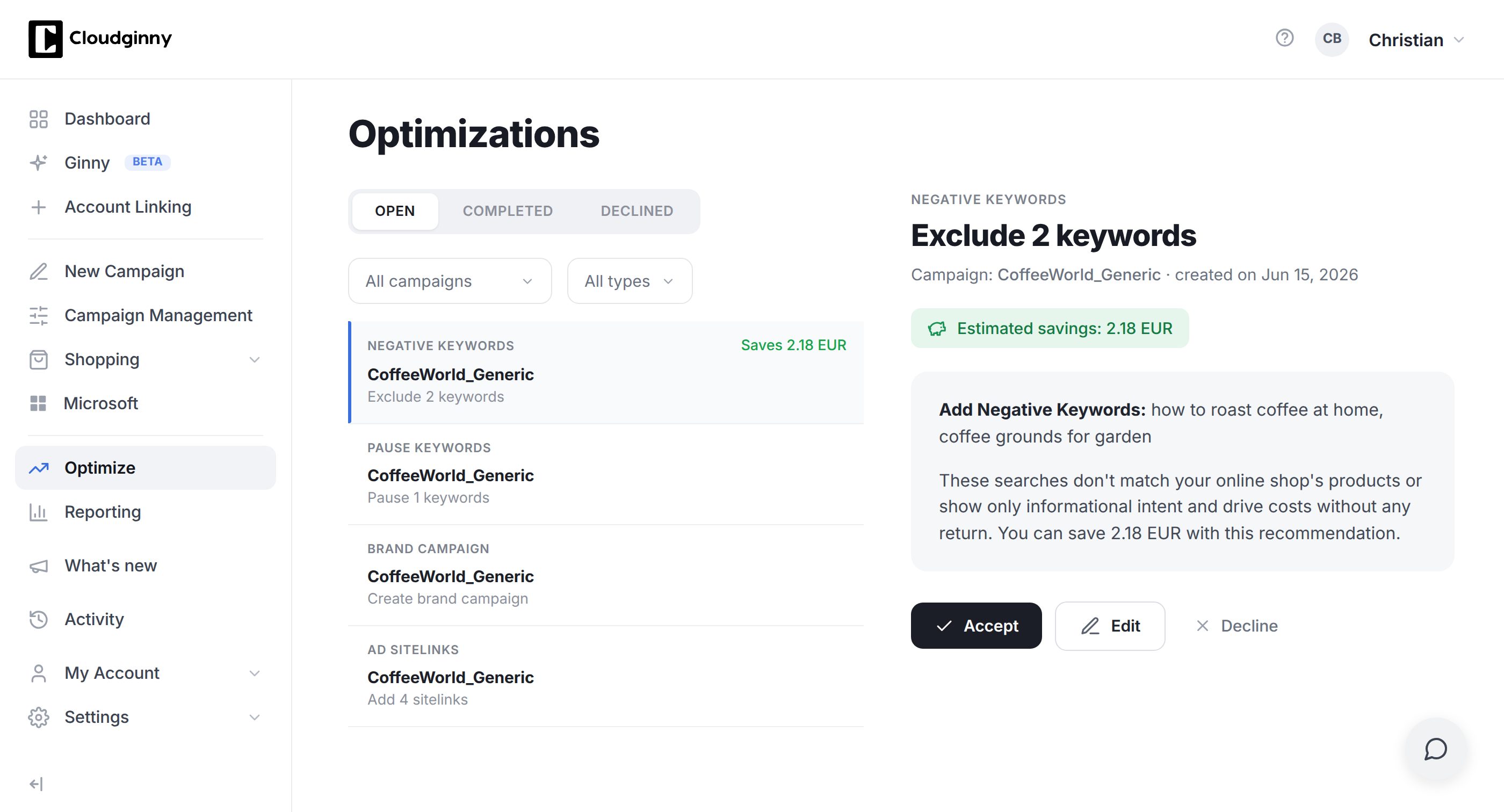
Word list, real costs, one click to apply. Editable beforehand.
Try Cloudginny for free, or book a free audit. We look at your search queries and show you which of them only cost money.

AI agent for Google Ads in e-commerce
© 2026 Cloudginny. All rights reserved.
