Shopping campaigns where you decide what runs

With Standard Shopping you advertise exactly the products you want to advertise. A campaign for just one brand, just your bestsellers, or for everything. Ginny builds it for you by chat, and you keep control: exclude, focus, reset, any time.

Set up a shopping campaign for just my brand “Brühwerk”, €10 a day.

Happy to. Here’s how I’d set it up:

  • Campaign typeStandard Shopping
  • Productsbrand “Brühwerk” only
  • Basisyour product feed
  • Daily budget€10

It only goes live after your approval. Want me to set it up like this? Reply Yes or No.

Write a message to Ginny …

Ginny can make mistakes. Nothing is carried out until you approve.

Supported & certified by
The campaign type

Image, price and full sight of every search term

Standard Shopping shows your products with an image and a price on Google Shopping, where people already search with intent to buy. The difference from other campaign types: you decide which products go into the campaign, and you see transparently which search terms your money is spent on.

In short: maximum control over your product advertising. And with Cloudginny you get that control without digging through the Google Ads interface.

Sponsored · Products

Espresso Machine “Barista Pro”

€449.00
yourshop.com ★ 4.8

Coffee Grinder with Conical Burr

€129.00
yourshop.com ★ 4.6

Espresso Beans 1 kg, Organic

€24.90
yourshop.com ★ 4.9

Tamper Set 58 mm, Stainless Steel

€34.00
yourshop.com ★ 4.7

This is what it looks like when someone searches for your products.

On video

How Ginny builds your Shopping campaign

How you set up and steer a Shopping campaign by chat.

Create

Targeted, not everything: one campaign for exactly your selection

Tell Ginny in chat what you want to advertise, individual products or a whole brand, and she builds the matching Shopping campaign from your product feed. You see exactly what gets created beforehand. The campaign only goes live once you approve.

That way you can, for example, put your high-margin products into their own campaign with their own budget, instead of throwing everything into one pot.

Steer

Your selection, changeable any time

Exclude and add back

Take individual products or whole brands out of the campaign, and bring them back any time. Nothing is final.

Focus deliberately

Limit the campaign to exactly the products you want to advertise. The rest stays out.

Reset to all products

One command, and the campaign runs across your entire range again.

And she reminds you, if you want

Many products you only take out temporarily, because they’re currently out of stock, because the season is over, or because you want to check the margin first. Just tell Ginny when to remind you, and she gets in touch in good time so the product goes back into the campaign. No sticky note on the monitor, no calendar entry that slips through anyway.

Runs in the background

Two watchdogs keep an eye out too

The same automatic watchdogs as with Performance Max also run over your Shopping campaigns. Built as equals on purpose.

Automatic

Loss scan

Cloudginny regularly scans your campaign for products that only ever burn budget, and puts ready-made exclusion suggestions in front of you to click.

Automatic

Brand protection

Spots when your campaign is chasing other brands’ search terms, and suggests suitable exclusions. Your budget stays with your products.
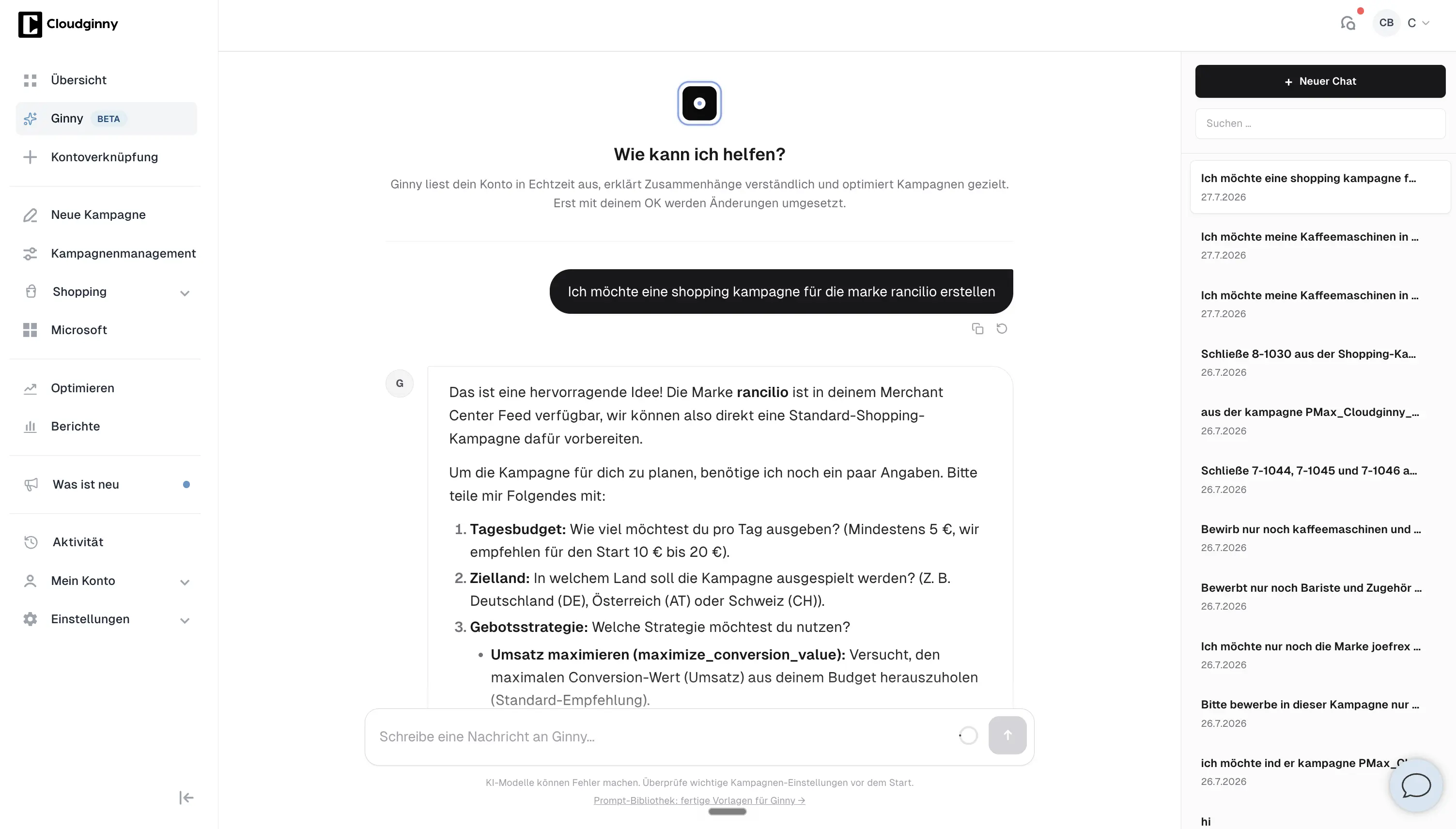
In the tool

Your Shopping campaign takes shape in the chat

app.cloudginny.com/shopping
Ginny prepares a Standard Shopping campaign for a brand in the chat

Your Shopping campaign, steered by chat instead of a click marathon.

Setup

Ready to go with two connections

  • A connected Google Ads account.
  • A Merchant Center with a synced product feed. That’s where your products, images and prices come from.
Steer safely

Nothing happens behind your back

You approve

Ginny shows you exactly what she wants to create or change beforehand. Only your yes triggers it.

Everything reversible

Excluded products and brands you bring back any time, or reset the campaign to all products.

Suggestion, not solo action

Even the automatic watchdogs decide nothing on their own. They put ready-made suggestions in front of you to click.

You can see what that looks like in real shops in the success stories.

From practice
“Without investing in campaigns, you don’t get the reach you need. But for it to be sustainable, it has to be profitable, and it should even be fun for the retailer. With Cloudginny, we’ve finally found that balance.”

Christian Sattler · Nähplatz.de

FAQ

Common questions about Standard Shopping

What’s the difference from Performance Max?
Standard Shopping runs on Google Shopping and gives you full control: you decide the products and see the search terms. Performance Max runs your products more broadly across Google’s channels and leaves more steering to Google. Both work with Cloudginny, more on PMax here.
Can Ginny create the campaign completely for me?
Yes. You tell her in chat which products or which brand, and she builds the campaign from your product feed. It only goes live after your approval.
Can I run a campaign for just one brand or specific products?
Yes, that’s exactly what Standard Shopping is for. A campaign aimed at individual products or a whole brand, with its own budget.
What if I want to advertise an excluded product again?
One command to Ginny, and the product or brand is back in. You can also reset to “all products” any time.
Can Ginny remind me to add a product back later?
Yes, if you want. When you exclude it, just tell her when to get in touch, for example when the stock is back or the season starts. She then reminds you in good time, and you decide whether the product goes back into the campaign.
Do the automatic watchdogs run with Standard Shopping too?
Yes. The loss scan and brand protection apply to Standard Shopping just as they do to Performance Max.

Your products. Your rules. Your budget.

Try Cloudginny for free, or book a free audit. We look at your Shopping campaigns and show you where budget is being left behind.

No obligation · Real numbers from your account