What is Google Ads? Explained simply for online shops
Christian Beeking
Co-Founder, Cloudginny
October 13, 202618 min read
As of October 13, 2026.
The essentials first
Google Ads is Google's advertising system. You pay to have your ads and products appear at the top for matching searches. You're charged per click, and there is no minimum budget. Which ad appears where is decided by an auction of bid and quality, for every single search. For online shops, the Shopping ad with image and price is the most important format, and it runs through Google Merchant Center. In our client accounts, a click costs €0.42 at the median, and a sensible start is €500 to €1,500 a month.
Google's own explanation and the usual glossaries tell you what Google Ads is. What it means for an online shop isn't covered there: which formats matter, what a click really costs, what has to be in place before the first campaign and where beginners lose money. Here you get Google Ads explained simply, from a shop's point of view and with figures from real merchant accounts instead of averages across all industries.
What is Google Ads?
Google Ads is Google's advertising platform, through which businesses run paid ads in Google Search, the Shopping tab, on YouTube and on partner websites, and usually only pay when someone actually clicks on the ad.
Until 2018 the system was called AdWords, for almost 18 years. The old name still appears in many forums and books, but it means the same thing.
What sets Google Ads apart from traditional advertising is the moment the ad is shown. A billboard is seen by everyone who walks past. A Google ad is seen by someone who has just typed “men's running shoes size 10”. That person isn't searching at some point in the future, they're searching now, and they know fairly precisely what they want. That's why Google Ads is the first paid channel for most online shops. The purchase intent is already there, and the ad only has to pick it up.
The difference lies in the moment the ad is shown
Billboard
Reaches everyone who walks past. Nobody knows whether anyone needs running shoes right now.
Google ad
Appears when someone is searching for “men's running shoes size 10” right now. The purchase intent is already there.
Google Ads has many formats, and most of them are secondary for a shop. This article therefore focuses on the three that take most of the budget in e-commerce: Shopping, Performance Max and search ads.
How does Google Ads work? The auction behind every ad
Every search that ads match triggers an auction that runs in milliseconds. It includes all advertisers whose keywords or products match the query. The highest bidder doesn't automatically win, though. Google calculates an Ad Rank for each ad, and according to Google's own documentation six factors go into it:
the bid
the quality of the ad and the landing page
Ad Rank thresholds
the competitiveness of this auction
the context of the search, such as device, location and time of day
the expected impact of ad assets such as sitelinks, which used to be called ad extensions
In simple terms, you can think of it as bid times quality. Quality has three parts, namely expected click-through rate, the relevance of the ad text to the search, and the experience on the landing page. In the account, Google shows this as the Quality Score on a scale of 1 to 10. It's a diagnostic value that tells you where an ad stands compared with the competition. For shops, that's good news. A relevant ad with a fast, fitting product page can overtake a competitor with a higher bid and pays less for the same position.
Paying less here literally means paying less than you bid. Your bid is a maximum. You're usually only charged what it takes to beat the Ad Rank of the next competitor below you. If you bid $1.20, you often pay only $0.70 or $0.80, depending on how strong the competition is in that one auction.
A simplified reading of the six factors in Google's documentation. How far below your bid you pay depends on the competition in each auction.
With search and Shopping ads, costs only arise with the click. The impression itself is free, no matter how often your ad appears. Display and YouTube campaigns can also charge per impression or view. For a typical shop launch, that doesn't matter.
Search ads add one more factor, the keyword match type. It determines how far Google may stray from your wording before your ad even enters the auction. What “exact match”, “phrase match” and “broad match” mean in practice is shown with an example on our page about search campaigns.
Google Ads or SEO: what's the difference?
Google Ads is paid placement that works from day one. SEO is organic visibility that takes months and costs nothing per click. Both bring visitors from Google Search, and that's about all they have in common.
Google Ads and SEO compared
Google Ads
SEO
Impact
Within hours of approval
Weeks to months
Cost
Per click, stops when the budget stops
Working time and content, no click price
Control
Product, region, time of day, budget freely selectable
Google decides what ranks
Placement
Ad slots at the top, in the Shopping tab, at the side
Organic results below
After switching off
Visitors gone
Rankings stay for a while
For an online shop, it isn't an either-or question. SEO builds long-term visibility for category and guide pages. Google Ads brings buyers to product pages from day one and can be steered by margin, season and stock levels. Most shops we see do both and fund one with the other.
Since September 2026, the balance in Europe has shifted further. Across the European Economic Area, Google has removed free product listings from the regular search results. Until then, merchants could use them to show their products directly in Search without a budget. Their place now goes to paid ads and comparison shopping services. Part of the organic product visibility that small shops counted on is gone. More on that in the Merchant Center section.
Which ad types are there?
Five ad types are relevant for an online shop, in order of importance: Shopping, Performance Max, search ads, Display and YouTube. Google itself counts around a dozen campaign types, depending on how you count. The rest hardly matter for shops.
The five ad types for online shops
Format
Where it appears
Role for shops
Cost per click
Shopping
Product tiles with image and price at the top of Search and in the Shopping tab
The most important format, usually the largest share of budget
Median €0.42, middle half €0.27 to €0.57 (our client accounts)
Performance Max
Automatically across all Google surfaces, with a product feed
Standard for shops with a broad range, little insight, lots of automation
Like Shopping, measured in the same accounts
Search ads
Text ads above the organic results
Brand, categories, products without a good image, B2B
Usually €0.50 to €1.50 (experience)
Display
Banners on partner websites and in apps
Mostly useful for remarketing only
Cents, often without purchase intent
YouTube
Video ads before and during videos
Brand building, rarely the starting point
Charged per view or impression
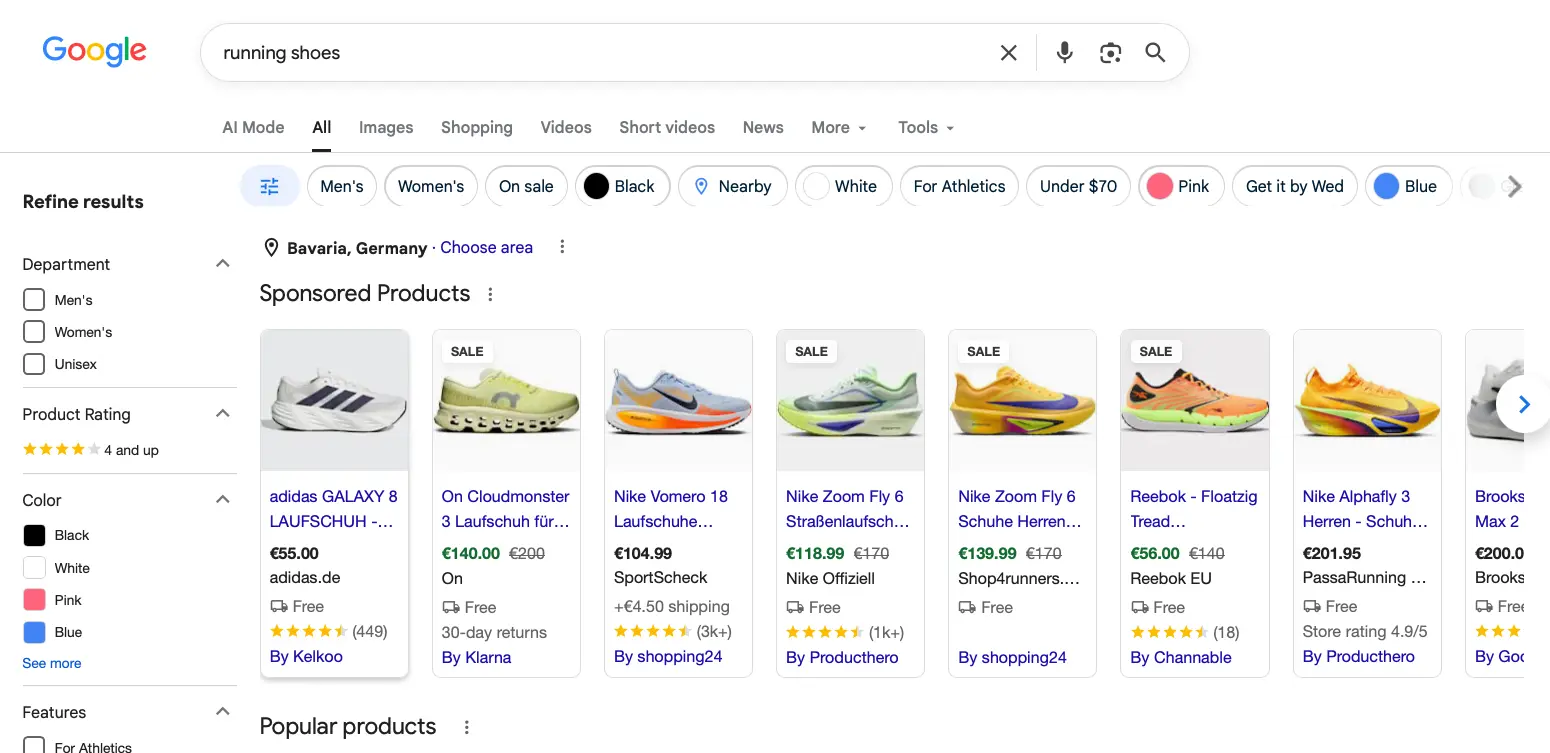
Shopping comes first because the format does exactly what a shop needs. It shows the product image, price and merchant name before anyone clicks. So a click comes from someone who has already seen and accepted the price. That's why Shopping clicks are cheaper than search clicks and, in our experience, lead to an order more often. How the format works in detail, what it costs and what you need for it is covered in our guide to Google Shopping.
Shopping ads in Google Search. You see image, price and merchant before you click. Screenshot: Google Search
Performance Max is Google's automated campaign. You provide the product feed, goal and budget, and Google distributes the ads itself across Search, Shopping, Display, YouTube and Gmail. For new shop campaigns, Google now suggests Performance Max as the default almost every time. The well-known drawback remains, because Google reveals little about where the money goes in detail. Search ads stay important for your own brand, for categories and for anything that doesn't work well as a product tile.
For shops, everything runs through Merchant Center
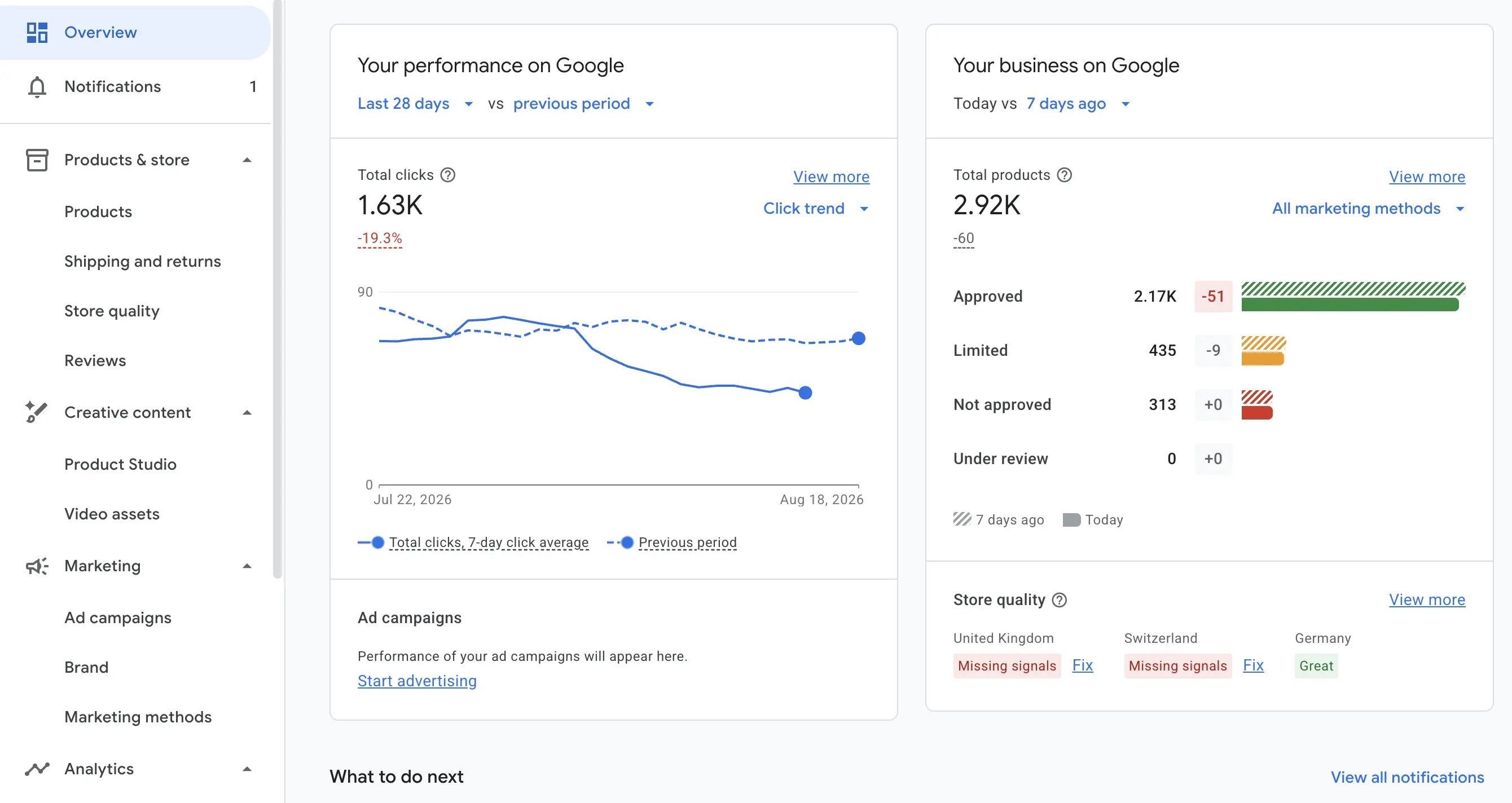
Google Merchant Center is the free account through which a shop delivers its product data to Google. Without it, neither Shopping nor Performance Max ads run. Both formats work without keywords. Google uses your product data to decide which searches a product matches. Your shop sends a product feed to Merchant Center for this, with title, description, price, availability, image, GTIN and shipping costs. Merchant Center checks every item against Google's policies and approves or disapproves it. Only approved products can be advertised.
The Merchant Center overview shows for every item whether it is approved, limited, not approved or still under review. Screenshot: Google Merchant Center
Two things here decide success more than any campaign setting: the quality of the feed and the serving. In the feed, the product title carries the most weight, because Google uses it to decide which searches an item matches. If it contains the item number or the short name from your inventory system, the product will show up for hardly any search. Brand, product type and the attribute customers search for belong at the front.
How product data travels
Your shopsends the product feed
Merchant Centerchecks every item and approves or disapproves it
Google AdsShopping and Performance Max, no keywords
Google Searchproduct ads with image and price
Google reads which searches a product matches from the feed data, above all from the title.
An approved product may be advertised. Whether Google actually shows it is decided by the algorithm within the budget. In our client accounts, only around a third of approved items get even a single paid impression at the median. The rest sit in the feed and wait. Disapprovals, on the other hand, are rarer than the forums suggest. At the median, the rate in our accounts is below one percent, but when it happens it often hits whole categories at once.
What happens to approved items
Items with at least one paid impressionaround a third
Disapproved itemsbelow 1%
0%25%50%75%100%
Medians across our client accounts.
Until recently, Merchant Center had a second benefit. Free product listings could appear directly in Google's search results without a bid. Across the European Economic Area, they have disappeared from there since mid-September 2026, along with the product carousels. Google removed them as a consequence of the Digital Markets Act and publicly confirmed this through its Ads Liaison. Search Engine Watch reports a drop of 90 to 100 percent for Germany, France and the Netherlands. The change doesn't apply in Switzerland. In Google Search in the EEA, Merchant Center is now mainly the basis for paid Shopping and Performance Max ads. If you want to be visible there with products, you need a Google Ads account and a budget.
Free product listings in the European Economic Area
until mid-Sept 2026Products appear in the search results without a bid
Sept 17 and 18, 2026Google removes them in the EEA, along with the product carousels
since thenTheir place in the search results goes to paid ads and comparison shopping services
The reason is the Digital Markets Act. The change doesn't apply in Switzerland.
How to set up Merchant Center, connect the feed and avoid the typical mistakes is covered in the Merchant Center practical guide.
How much does Google Ads cost?
Google Ads has no base fee, you only pay for clicks. In our client accounts, a Shopping click costs €0.42 at the median. Google charges neither a setup fee nor a minimum budget, and there is no contract term. You set an average daily budget per campaign. On individual days Google may spend up to twice that, but billing works over the month. According to Google, you're never charged more than 30.4 times your daily budget. With a $30 daily budget, that's at most $912 a month, however the individual days turn out.
How Google caps your monthly costs
$30average daily budget
×
30.4factor according to Google
=
$912at most per month
On individual days Google may spend up to twice as much, here up to $60.
What a click costs is decided by the auction. This is where real figures help. Guides quote averages of around €4 per click for retail. Where the number comes from is rarely stated, but the well-known US benchmarks across all industries and formats are in that range. Our figures look different. We analysed the Shopping and Performance Max campaigns in our client accounts, online shops in German-speaking countries over the twelve months to July 2026. The median cost per click there is €0.42, with the middle half of accounts between €0.27 and €0.57. Search ads are more expensive, where we usually expect €0.50 to €1.50. If you plan with €4, you overestimate the click costs of Shopping ads almost tenfold and may give up on it altogether.
What a click costs
Average quoted in guides€4.00
Search ads, our experience€0.50 to €1.50
Shopping and Performance Max, median of our client accounts€0.42
€0€1€2€3€4
Euros per click, all bars on the same scale.
What a shop should realistically budget per month
The rule of thumb for a start is €500 to €1,500 a month. It can be derived. Google's bid automation learns from orders. Google names 15 conversions in 30 days as the minimum for a ROAS target, and in our experience it only works reliably from 30 to 50 orders a month. At the conversion rate of our accounts, 1.9 percent at the median, that takes roughly 1,600 to 2,600 clicks. At €0.42 each, that's about €700 to €1,100 of monthly budget. You can start with less, but the learning phase takes longer and results fluctuate more.
Where the monthly budget rule of thumb comes from
Step 1
30 to 50orders per month
÷
1.9%conversion rate, median
=
1,600 to 2,600clicks per month
Step 2
1,600 to 2,600clicks per month
×
€0.42per click, median
=
€700 to €1,100budget per month
Rounded. In our experience, bid automation works reliably from 30 to 50 orders a month.
And what do shops actually spend? The median shop in our accounts is at just over €700 a month, with the middle half between around €260 and €1,800. What clicks cost per product range, how break-even follows from margin and basket size, and which hidden cost drivers eat up a budget is covered in detail in our guide on Google Ads costs.
Monthly budgets compared
Rule of thumb for a start€500 to €1,500
Actual spend, middle half of our client accounts€260 to €1,800, median just over €700
€0€500€1,000€1,500€2,000
The vertical line marks the median.
What you need before your first campaign runs
Before any budget flows, account, tracking, feed and goal have to be in place, in this order:
Account: A Google Ads account and a Merchant Center account, linked to each other, with a verified shop domain and shipping and return policies set up. It's a formality and takes an afternoon. Advertiser verification can take a few days, though.
Tracking: Conversion tracking that reports orders to Google with their actual value. Without tracking, Google only sees clicks and can't learn which of them bring revenue. The most common mistake happens during setup, when every order is reported with the same fixed amount. Bidding then optimises for the number of orders instead of revenue. Since 2024, Consent Mode v2 is part of this too, otherwise European conversions are missing from the measurement.
Feed: A clean product feed with meaningful titles, complete GTINs, correct prices and daily updates. Every error here is paid for later with ad budget.
Goal: A goal that fits your margin. With a 30 percent gross margin, you need a ROAS of at least 3.3 to break even. If you don't work this out beforehand, you can't judge afterwards whether the campaign works.
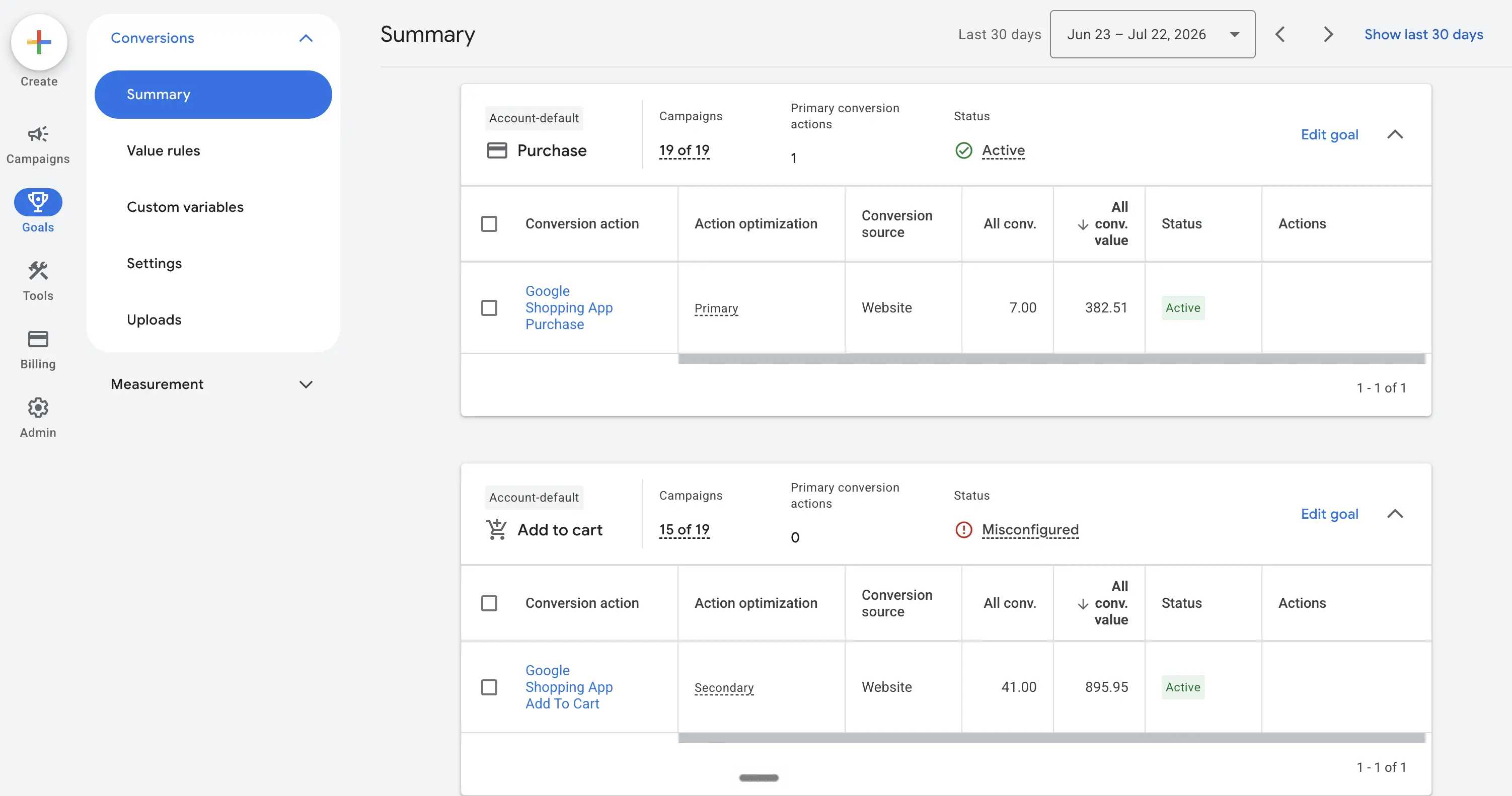
Under Goals you can see whether your conversions are working. Here, purchase is active and the add-to-cart conversion is misconfigured. Screenshot: Google Ads
Yes, under two conditions. Neither has much to do with the size of the shop.
The first is margin. With the median values from our accounts, an order via Google Ads costs around €22 in ad budget, that is €0.42 per click divided by a 1.9 percent conversion rate. With a €66 basket and a 35 percent margin, around €1 per order remains after advertising. That's tight, but it shows what matters. With a higher margin, a larger basket or a better conversion rate, you earn significantly more at the same cost per click. If you're below a 25 percent margin and a €40 basket, you'll struggle, however big your account is.
The maths with median values
Ad cost per order
€0.42cost per click
÷
1.9%conversion rate
=
around €22ad budget per order
Gross profit per order
€66basket
×
35%margin, example
=
€23.10gross profit
What remains
€23.10gross profit
−
€22ad budget
=
around €1per order
Cost per click, conversion rate and basket are medians from our client accounts, the margin is an example.
The second condition is time. Three quarters of our client accounts spend less than €1,800 a month, a quarter even less than €260. So Google Ads works with much smaller budgets than agencies usually assume. Small accounts fail through a lack of upkeep, through search terms that never get excluded, products that stay disapproved and budgets that nobody adjusts. A small account forgives this less than a large one, because every mistake eats a larger share of the budget.
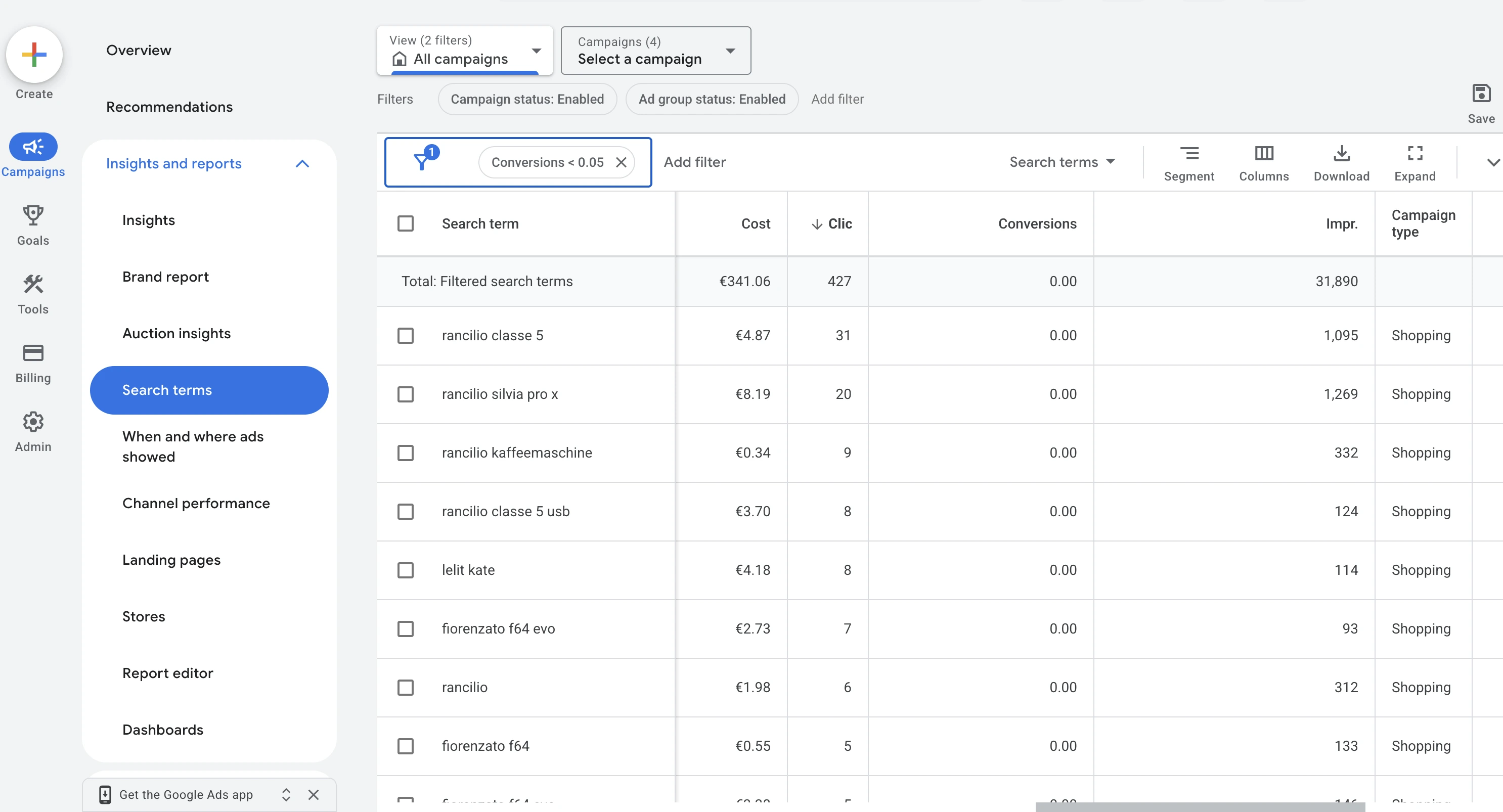
The search terms report, filtered to terms without conversions. Every row cost money and sold nothing. Screenshot: Google Ads
So start small and raise the budget in steps. As a rule of thumb, by no more than about 20 percent at a time and no earlier than after a week, so that bidding doesn't have to start learning from scratch every time.
The mistakes that cost beginners money
The five most expensive beginner mistakes are preset ad networks, the location option “Presence or interest”, unmanaged broad match keywords, one ROAS target for the entire range and budget caps that nobody watches. Hardly anyone fails because of the cost per click. We find all five in almost every account we take over.
Preset ad networks: When you create a search campaign, the Display Network and search partners are preselected. For shops, both deliver cheap clicks without purchase intent. You can deselect them in the campaign settings under Networks.
Location option “Presence or interest”: This is a default as well. It also shows your ads to people who are merely interested in Germany but sit in Brazil and can never order from you. The right choice is “Presence”.
Broad match keywords without upkeep: Without a regular look at the search terms report, Google stretches your wording generously. Part of the clicks then lands on searches that never lead to an order. In our client accounts, that's around 10 percent of the budget, even though these accounts are cleaned up continuously. Where nobody adds exclusions, the share is higher.
One ROAS target for everything: If bestsellers and clearance items run in the same campaign with the same target, the strong products carry the weak ones. On average everything looks fine, but nobody knows which items really make a profit.
Budget caps nobody watches: Daily budgets often slow campaigns down without anyone noticing. We analysed the status “Limited by budget” across our client accounts. Almost half of the active campaigns hit their limit on at least some days, around a quarter on most days. The surprise was which campaigns it hit, namely mostly those with below-average ROAS. So the cap is rarely the problem, but not looking is.
Campaigns with the status “Limited by budget”
at the limit on at least some days47%
at the limit on most days26%
0%25%50%75%100%
Share of active campaigns in our client accounts.
How to find these and the other points in your own account is covered, with a printable checklist, in our Google Ads audit.
Google Ads needs ongoing care: do it yourself, hire an agency or automate
A Google Ads account isn't finished after setup. You check search terms and budgets weekly, ads and landing pages monthly, structure and targets once a quarter. In between come disapprovals in Merchant Center, season changes and price changes. So the question is less whether you need Google Ads than who takes care of it.
What gets checked when
Rhythm
What you check
Weekly
Search terms and budgets
Monthly
Ads and landing pages
Quarterly
Structure and targets
Ongoing
Disapprovals in Merchant Center, season changes, price changes
Doing it yourself is realistic if someone in the shop knows the account and keeps an hour free for it every week. In practice we usually see the same pattern. The setup works, the weekly upkeep lasts two or three months, then it fizzles out.
An agency brings experience and time. But it costs a monthly fee or a share of the ad budget, and with small budgets the service quickly eats a large part of what it achieves. When that pays off and when it doesn't, we've calculated in Google Ads agency vs. tools.
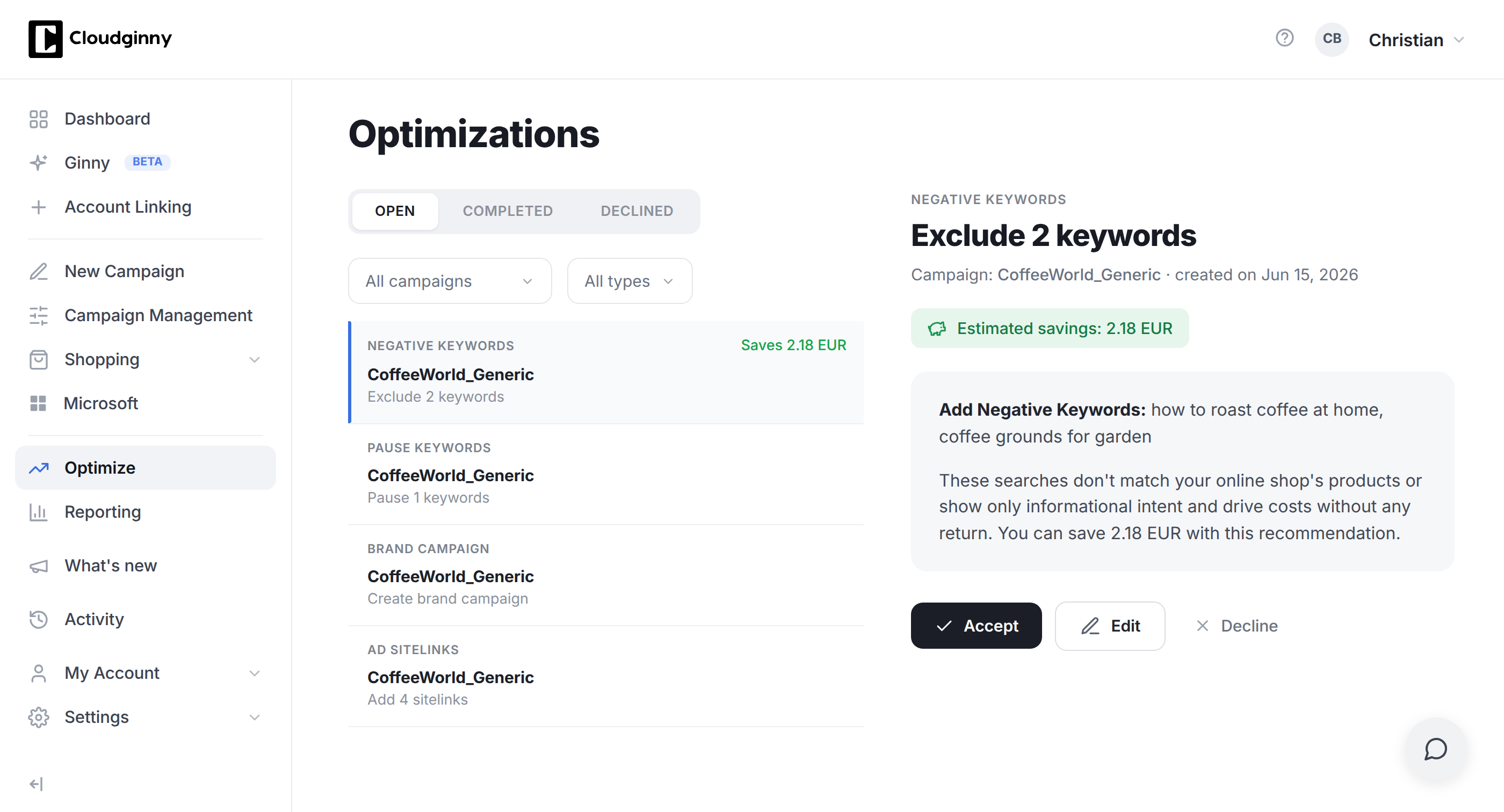
For us, automating means that an AI agent takes over the recurring work. Ginny checks your account continuously for the points in this article. She explains in plain language what she has found and suggests the change with a reason and an estimated effect. You approve or reject. Nothing that costs money happens without your click. For shops without their own marketing department, it's the middle way between doing it yourself and an agency, from $149 a month excluding VAT, cancellable monthly.
A suggestion from Ginny with a reason and estimated savings. You accept, edit or decline. Screenshot: Cloudginny
one hour a week
Do it yourself
Realistic if someone in the shop knows the account. Upkeep often fizzles out after two or three months.
fee or share of budget
Agency
Brings experience and time. With small budgets, the service eats a lot of the result.
from $149 a month
Automate
Ginny checks continuously and makes suggestions. Only what you approve gets applied.
Prefer to automate?
Ginny checks your account continuously and suggests every change with a reason. Only what you approve gets applied. You can try it free for 7 days.
Google itself charges no fee, you only pay for clicks. To start, you should plan €500 to €1,500 a month so that the automated bidding gets enough orders to learn from. Half of our client accounts spend between around €260 and €1,800, with the median at just over €700. At the top end, your daily budget times 30.4 caps the monthly costs.
Can you do Google Ads yourself?
Yes. Account, Merchant Center and a first campaign can be set up in an afternoon. For JTL, Shopify, WooCommerce and Shopware, we have step-by-step guides for this. The harder part is keeping at it, because search terms, budgets and disapprovals need checking every week. If you can't manage that, you need an agency or a tool that takes over the recurring tasks.
Can I use Google Ads as a private individual?
Anyone with a Google account can create a Google Ads account. Google requires advertiser verification with proof of identity for this. Shopping ads, however, require a Merchant Center with your own shop, legal notice and return policy. If you only want to sell a single item, you're better off with a classifieds platform.
What does Google Ads do for me?
It brings buyers who are searching for your product right now, from day one and controllable by product, region and budget. Whether it pays off depends on your margin. At the median of our accounts, one advertising euro brings €3.80 in revenue. With a 30 percent gross margin, break-even is at a ROAS of 3.3, and everything above that is profit from the channel.
How long does it take for Google Ads to work?
Google usually reviews new ads within one business day, after which they run. Automated bidding then needs a learning phase of about one to two weeks and, in our experience, 30 to 50 orders before results stabilise. A new campaign can therefore be judged reliably after four to six weeks at the earliest. Any major change to budget or structure partly restarts the learning phase.
Cloudginny: Cost per click, conversion rate, basket size, ROAS, monthly budgets, reach, disapproval rate, wasted spend and budget limits from the Shopping and PMax accounts we manage
Christian Beeking is co‑founder of Cloudginny, the AI agent for automating Google Ads in e‑commerce. Before Cloudginny, the team managed more than 100 million euros in Google Ads budget for brands such as MediaMarkt, Cisco and Bose, and has now poured that knowledge into Ginny. Cloudginny is an official Google Partner, a WebStollen partner and part of the German Accelerator.
Most guides to WooCommerce and Google Ads date from the time when the plugin was still called Google Listings & Ads and free product listings showed up in Google Search. Both have changed. This guide shows the 2026 route: plugin or feed extension, shipping and unit price, tracking without double counting, the most common errors and why the campaign belongs directly in Google Ads.
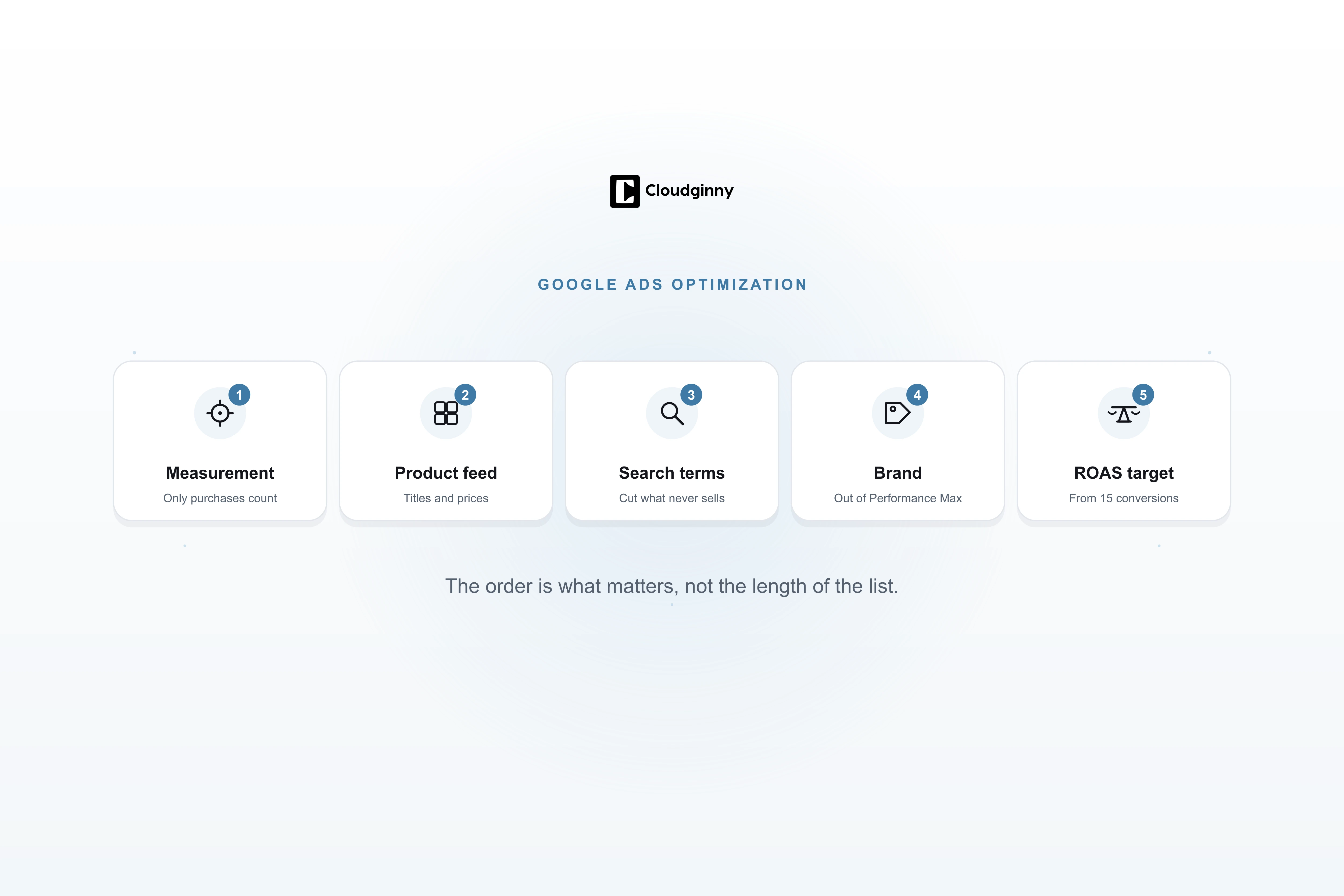
Most guides to Google Ads optimization are lists of ten equally weighted tips. In an online shop, though, the order decides: if you fine-tune bids while Google counts page views as sales, you only amplify the error. This guide shows the five levers in the order in which we tackle shop accounts, with figures from our customer accounts and the right rhythm for changes.
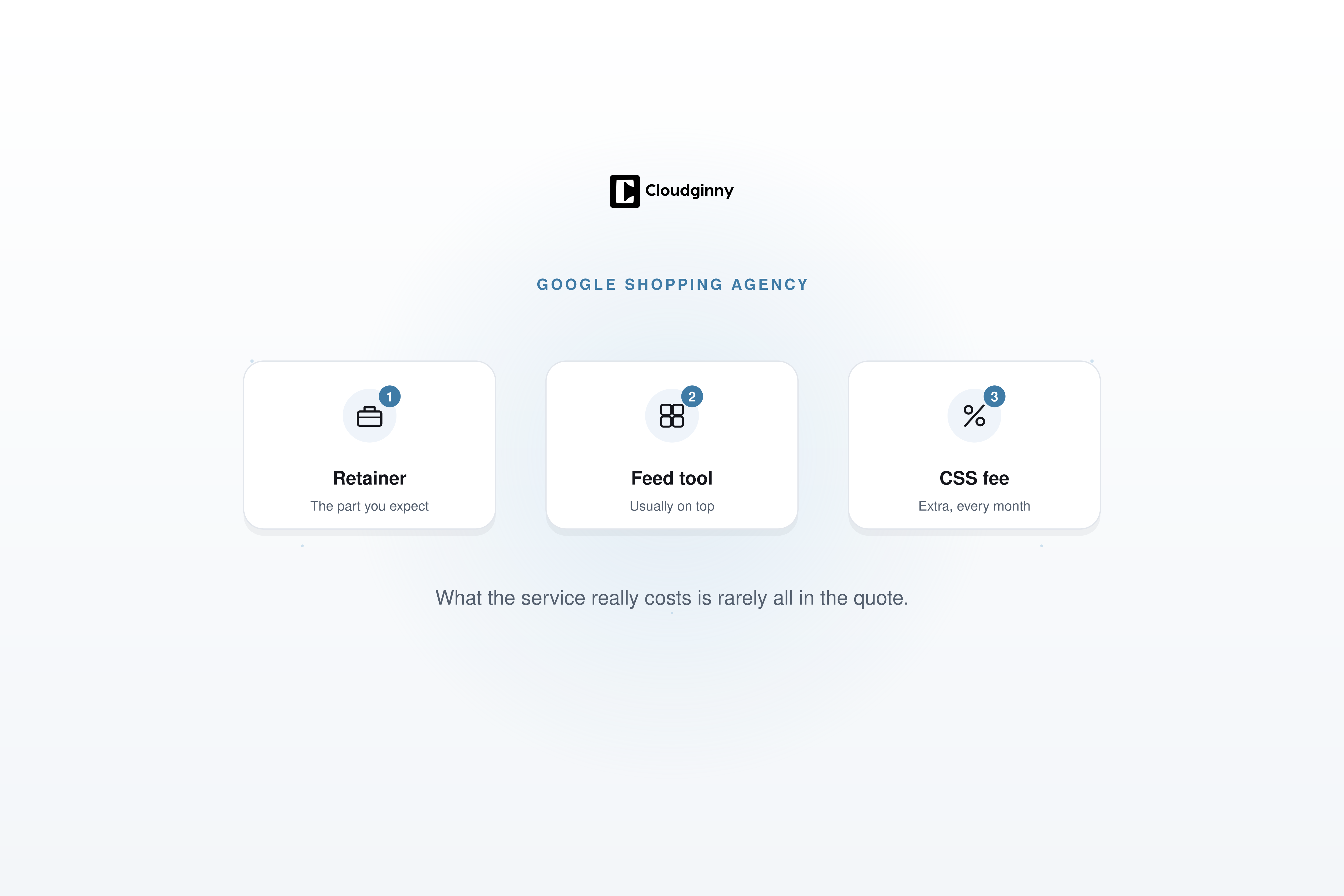
A Google Shopping agency only pays off from around $7,500 to $10,000 in monthly ad spend, and the feed tool, CSS fee and setup come on top of its fee. Most shops spend far less. This article covers what a Shopping agency really costs, what’s behind the promised 20 percent CSS savings, how to spot a bad offer and when an AI is enough for ongoing maintenance.