Google Ads Optimization. The Levers for More Shop Revenue
Christian Beeking
Co-Founder, Cloudginny
November 2, 202619 min read
Last updated: November 2, 2026.
Most guides on this topic are lists of ten or more tips that are all supposed to carry the same weight, from ad copy to device bid adjustments. In an online shop, though, the order is what decides. If you fine-tune bids while Google counts page views as sales, you are optimizing for the wrong number, and every further step amplifies the error.
That's why the five levers here are listed in the order in which we tackle them in shop accounts. On top of that come figures from our customer accounts in the DACH region and the situations in which you're better off changing nothing.
How can I improve Google Ads?
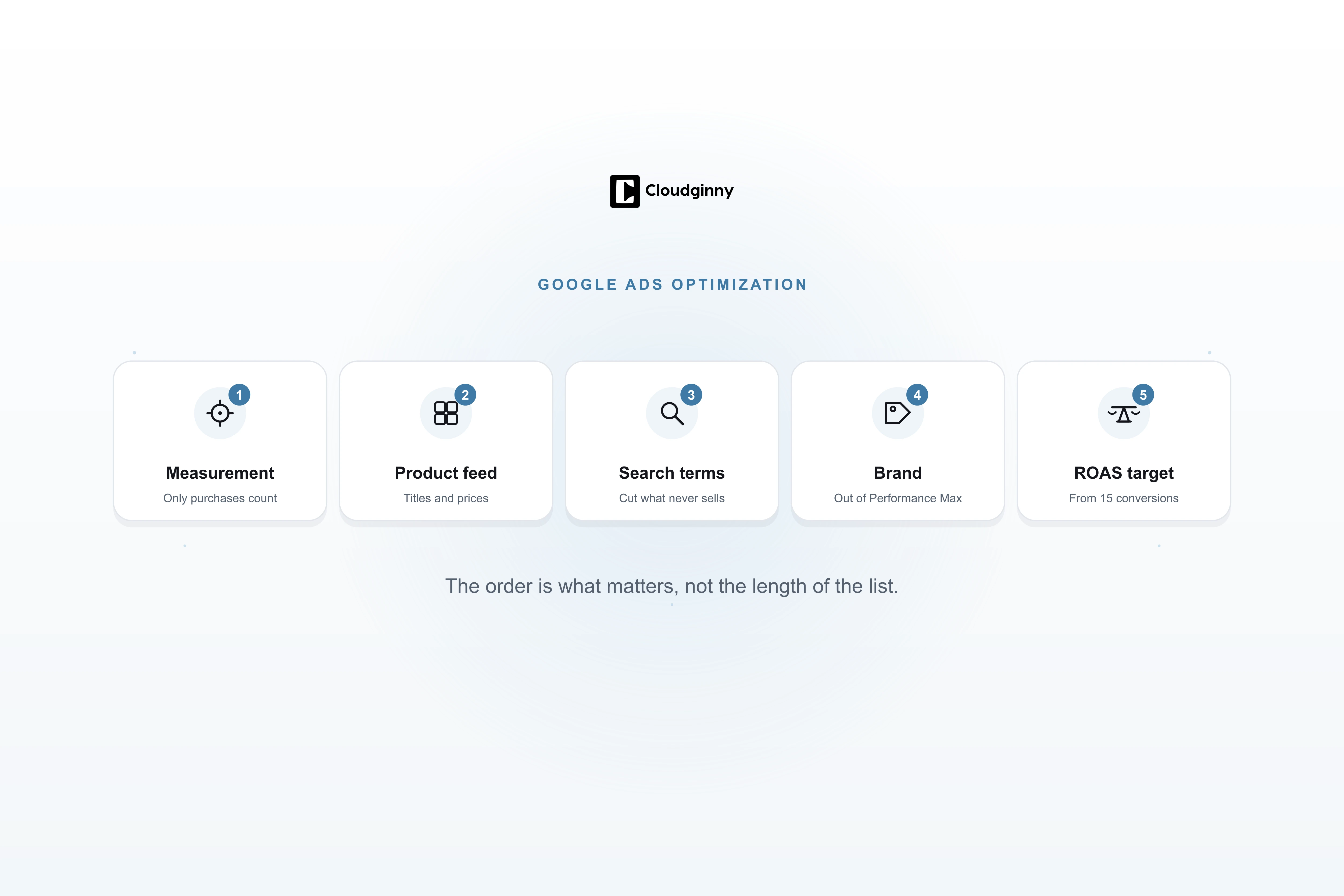
By tackling the levers in the right order: measurement first, then product data, then search terms and brand, and the ROAS target last. Each lever builds on the previous one, because Google always optimizes for the data you provide.
Fix the measurement so that only purchases with their real order value count as conversions.
Maintain the product feed and keep it in line with the product pages.
Review search terms once or twice a week and exclude whatever never sells.
Take your own brand out of Performance Max and manage it in a separate Search campaign.
Only set a ROAS target from 15 to 30 conversions in 30 days, and only raise budget where the campaign is above break-even.
Important
The order isn't a ranking by revenue. It follows the dependencies. Without clean measurement, every further lever optimizes for wrong numbers, and the ROAS target comes last because it needs enough clean conversions.
Does Google count the right sales?
Not always, and when it doesn't, every bid strategy works against you. Google Ads optimizes for primary conversion actions. According to Google's help page, they appear in the “Conversions” column and feed into bidding, while secondary actions are for observation only, unless they are part of a custom goal. If page views or clicks on “Add to cart” are set up as primary actions next to the purchase, Google optimizes for these cheaper signals.
A case from the Shopify Community from December 2025 shows what this looks like. With the same budget, a merchant had almost 24 sales via Google Ads in October and 4 in November. The account suddenly showed the number of page views as the conversion value, and the post suspects that the change was accepted through a Google recommendation. The most important advice in the thread: make sure the purchase is the only primary goal.
This isn't rare. In our customer accounts, we found at least one such error in around four in ten: two purchase actions set as primary at the same time, a page view, add to cart or checkout start as a primary goal, or no purchase at all as a primary conversion. About one in six accounts had two primary purchase actions alone, and then every order that both of them record counts twice.
Measurement errors in our customer accounts
around 4 in 10accounts with at least one error in their conversion actions
about 1 in 6accounts with two primary purchase actions
Cloudginny accounts in the DACH region, conversion actions as of November 2026, including errors that Ginny has fixed since the account was connected.
For a shop, that means: the purchase is the only primary conversion, and it's passed on with the actual order value. Cart, checkout start and newsletter run along as secondary actions, so you can see them without Google bidding on them. Without the dynamic value, a $400 order counts as much as a $15 one. If purchases are recorded twice, for example via the Google Ads tag and additionally via an import from Google Analytics, both as primary actions, the account reports a ROAS that never existed.
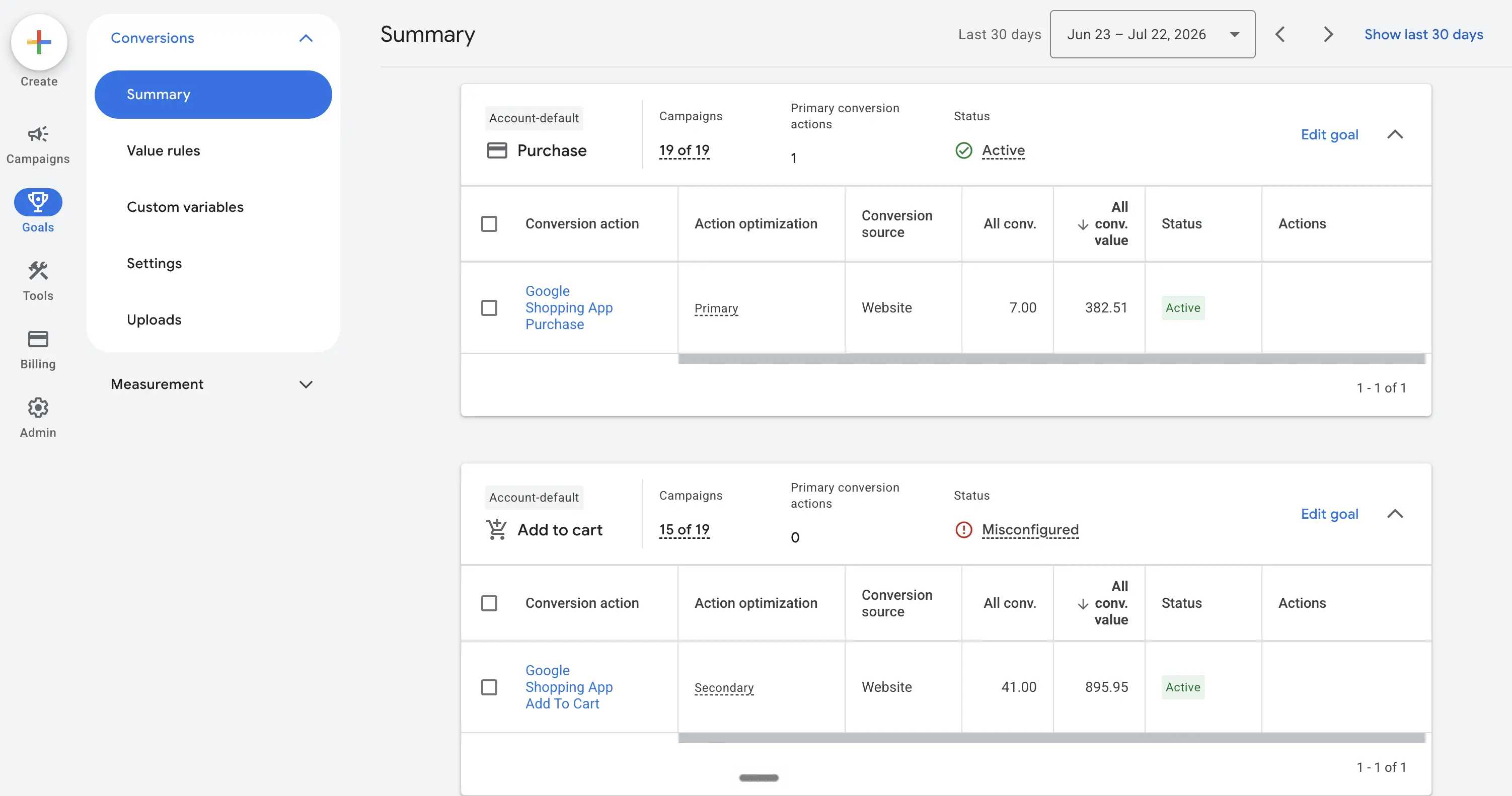
This is how it should look: the purchase is the only primary action, and add to cart only runs along for observation. Screenshot: Google Ads
This is quick to check. The conversion summary in Google Ads shows which actions are marked as primary. Then compare the conversions of the last few weeks with the orders your shop attributes to Google Ads. If the account is clearly above that, it is probably counting twice, and if it is far below, purchases are missing. Enhanced conversions improve attribution, and Consent Mode lets Google model purchases from visitors who haven't given cookie consent. Our setup guides for JTL shops and Shopify describe how to set up tracking properly.
Do feed, ad and landing page match?
With Shopping ads, the feed is the ad. Title, image and price come straight from the product data, and based on this data Google decides which search queries a product appears for at all. For shops with Shopping campaigns, feed maintenance is therefore one of the most effective levers.
Impressions show how much is left untapped there. In the median of our customer accounts, only a good third of the approved products get a paid impression at all, and in catalogs with more than ten thousand items only a good tenth. The rest sits in the feed without ever being seen.
The titles usually make the biggest difference. Google allows up to 150 characters, often only the first 70 or so are visible, and the Merchant Center help recommends putting the most important details first. “Women's rain jacket waterproof with hood, navy, size M” matches more search queries than an internal model name like “Aria 2”. Add complete GTINs, the right product category and custom labels for margin or bestsellers, so that campaigns can be split along them.
Matches few search queriesInternal model name: “Aria 2”
Matches more search queriesMost important details first: “Women's rain jacket waterproof with hood, navy, size M”
The second part of this lever is consistency with the product page. If the price in the feed differs from the one on the page, Google can disapprove the product. Disapprovals are rare in our accounts, with a median below one percent, but price mismatches are the most common reason, often because price changes in the shop only arrive with the next feed sync. Our article on disapproved products in Merchant Center explains what's behind the most common disapprovals.
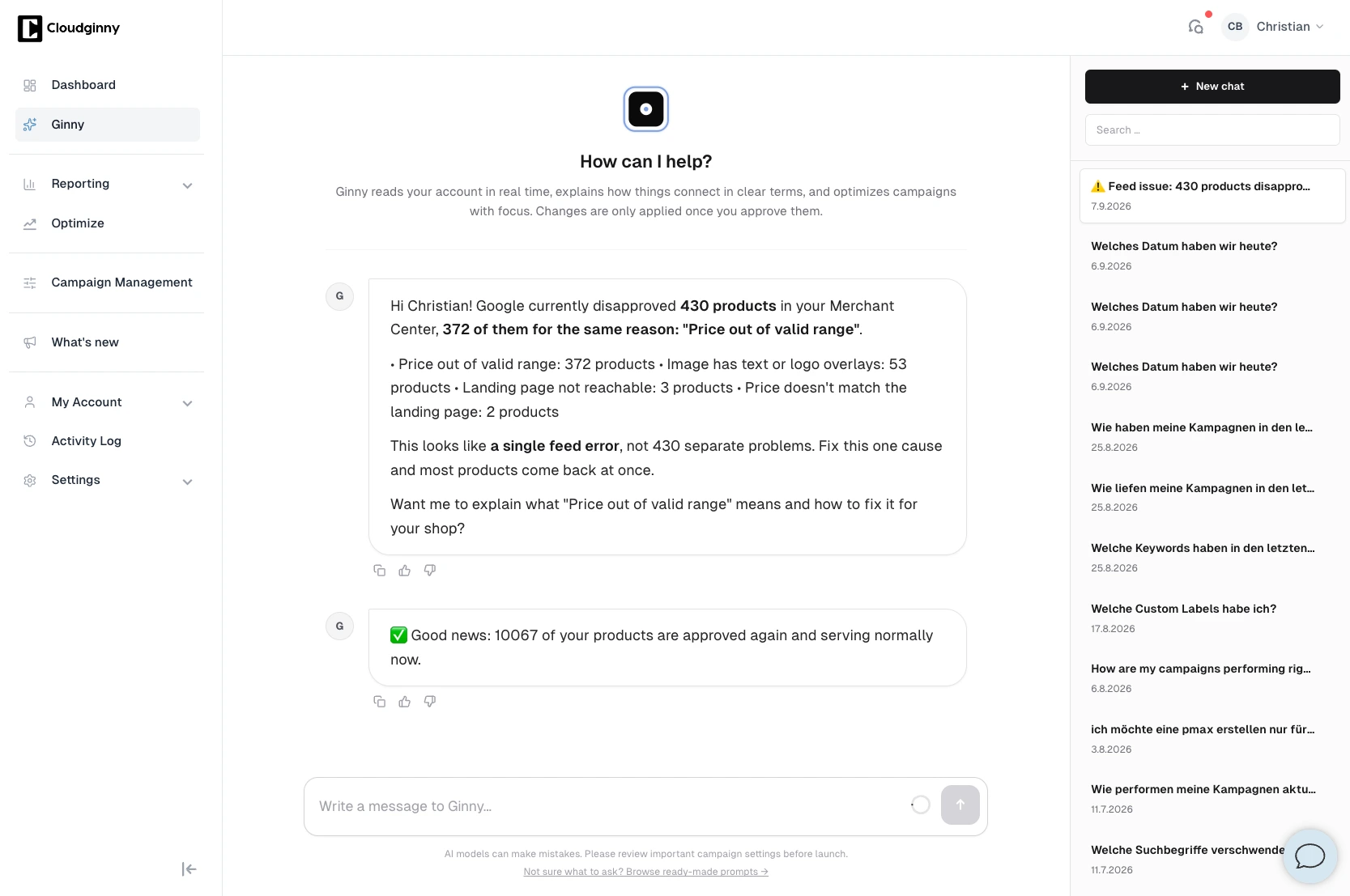
Ginny groups disapprovals by reason. Here, 372 of 430 go back to a single feed error, and fixing it brings most of the products back. Screenshot: Cloudginny
For Search campaigns, Google offers Quality Score as a guide. It's given for individual keywords on a scale of 1 to 10 and is made up of expected click-through rate, ad relevance and landing page experience. Google itself calls it a diagnostic tool that plays no role in the auction. A low score shows you where search term, ad text and page don't fit together, but it isn't a goal in itself. An ad for “women's rain jacket waterproof” belongs on the matching category page, not on the homepage.
Which search terms should you exclude?
All those that collect clicks for weeks and never sell, and everything that clearly doesn't fit your range. In our customer accounts, around a tenth of the budget goes to search terms that have collected ten or more clicks without a single conversion, even though these accounts are maintained continuously.
That's why you go through the search terms report once or twice a week, depending on account size. You can add exclusions daily, unlike changes to budget or bid strategy. A minimum amount of data protects you from mistakes: a term with three clicks and no purchase isn't wasted spend yet, and we only look once a term reaches double-digit clicks. Narrowly phrased exclusions are also safer than broad ones, because a word that's too general also blocks related queries that do sell.
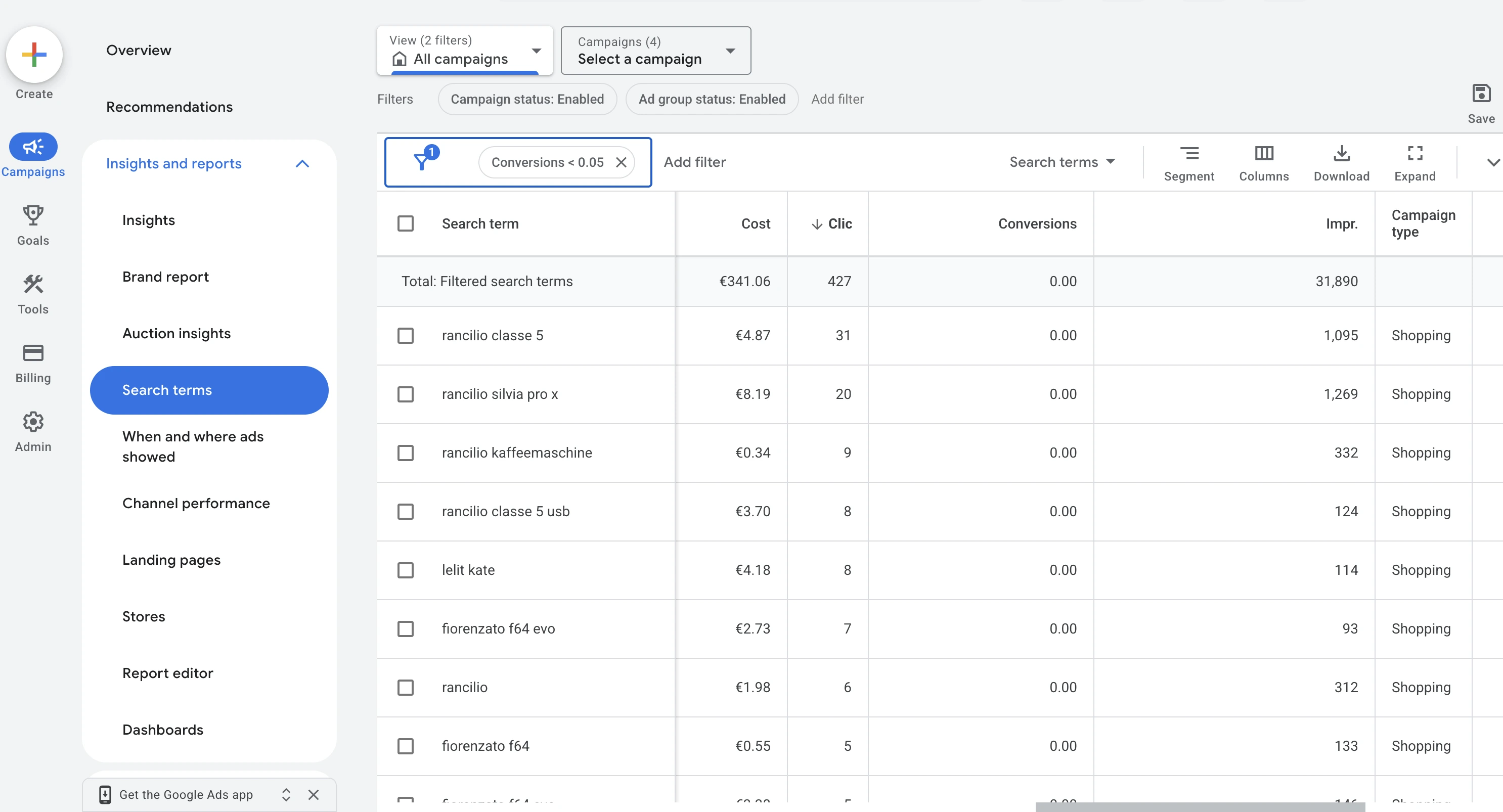
Filtered to search terms without a conversion: 427 clicks and €341.06 in four weeks. Terms with double-digit clicks are the candidates for exclusion. Screenshot: Google Ads
For Performance Max, this now works the same way. Google shows a search terms report for this campaign type too, and negative keywords can be added directly at campaign level, where they apply to Search and Shopping. The page on negative keywords shows how Ginny finds such terms and suggests them to you for exclusion.
Does your brand belong in Performance Max?
Better not. People searching for your shop name usually want to come to you anyway. If these searches run through Performance Max, the campaign picks up cheap sales, many of which would have come through a brand campaign or organically, and its ROAS looks better than its real performance.
In Performance Max, you therefore exclude your own brand, via a brand list in the campaign settings or via negative keywords at campaign level. According to Google's help page, brand exclusions apply there to Search, Shopping and YouTube search inventory, negative keywords only to Search and Shopping. For the brand terms, you then set up a separate Search campaign. Brand clicks are usually cheap, and in a campaign of their own you can see what they cost and bring, separately from what Performance Max achieves with new customers.
Managing brand and new customers separately
Searches for your shop name
Brand searchcustomers want to come to you anyway
Separate Search campaigncost and revenue visible separately
All other searches
Product searchmostly new customers
Performance Maxwith brand exclusion
Exception: own-label brands that customers search for like a product.
One exception is own-label brands that customers search for like a product. Then Shopping ads on brand searches can still make sense, and in Performance Max, Google lets you allow Shopping ads on such searches despite a brand exclusion.
Which ROAS target fits your margin?
A target above your break-even, and only once there's enough data. You determine the break-even ROAS by dividing 1 by your margin after purchase cost, shipping and payment fees. At a 35 percent margin it's 2.86, at 25 percent it's 4.0. Below that, every sale via Google Ads costs you money. The calculator in our article Calculate ROAS works out the value for your shop.
How to work out your break-even ROAS
At a 35% margin
$1ad spend
÷
35%margin after purchase cost, shipping and payment fees
=
$2.86minimum revenue per dollar of advertising
At a 25% margin
$1ad spend
÷
25%margin
=
$4.00revenue per dollar of advertising
If your ROAS is below that, every sale via Google Ads costs you money.
For Search and Shopping campaigns, Google requires at least 15 conversions within 30 days for a target ROAS, as the Google help page on target ROAS states. We only set the target from 15 to 30 conversions. Before that, the campaign is better off with “Maximize conversion value” without a target, because a target based on too little data restricts the algorithm before it has learned which search queries sell. The prerequisite is the clean measurement from the first lever: 15 conversions, half of which are page views, are not 15 sales.
Once the data is there, set the target cautiously, for example at the level of the ROAS of the last four weeks, and raise it in steps. Google itself warns that a target set too high limits traffic. If the previous ROAS is below your break-even, a higher target alone won't help much. Then measurement, feed and search terms come first.
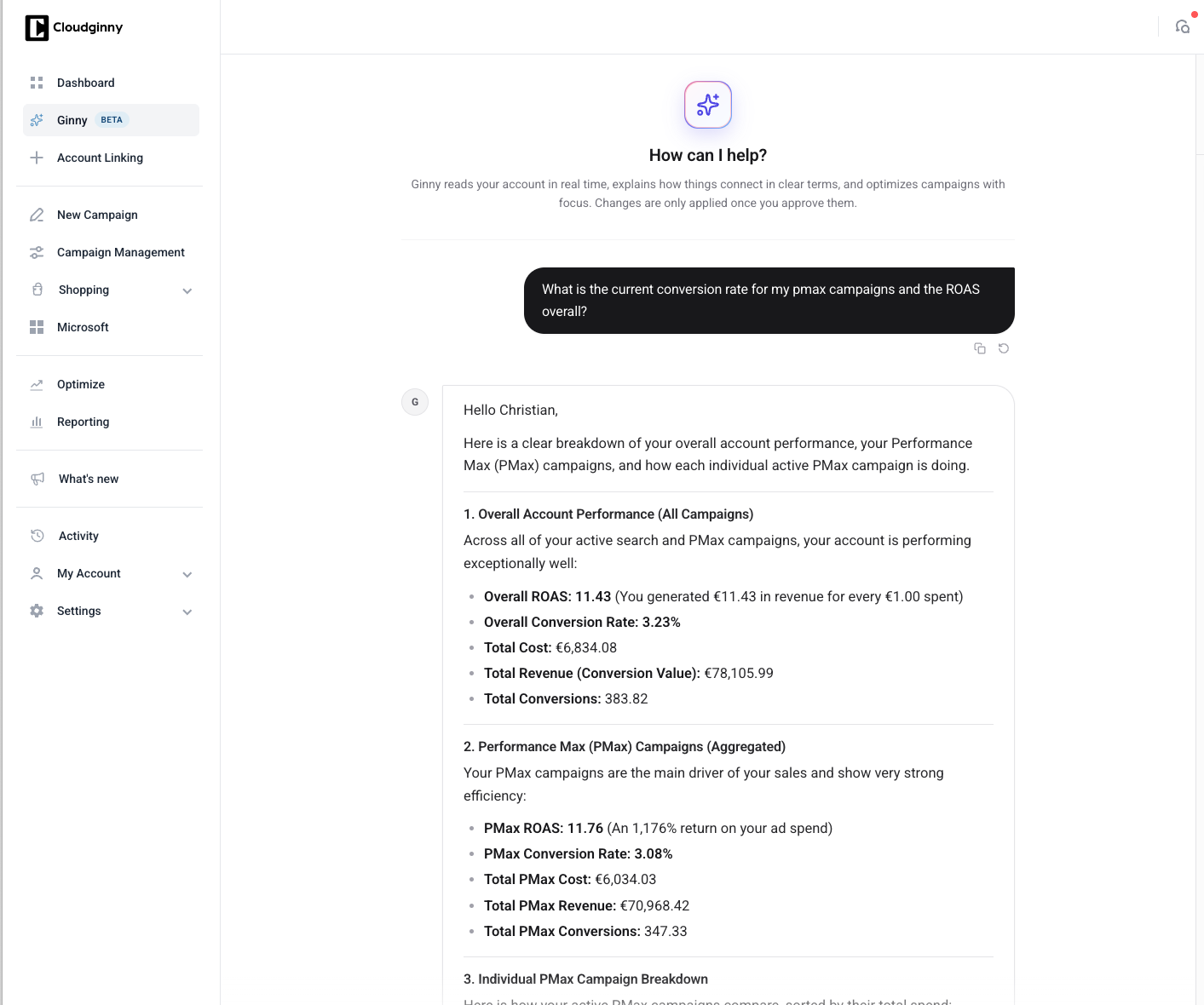
Ask Ginny for the ROAS of your campaigns directly, overall and per campaign. Compare it with your break-even before you set a target. Screenshot: Cloudginny
Since August 17, 2026, the target has also become more binding. According to Google, budget-limited campaigns with a target, meaning target ROAS or target CPA, now steer more precisely to the value entered. Some of these campaigns used to land above their target, and now they move closer to it. If you entered a low target because the campaign exceeded it anyway, you'll now land closer to that lower ROAS.
The same logic applies to the budget. Only a campaign above break-even gets more money, and a budget limit alone is no reason. In our September 2026 measurement, the median ROAS of permanently budget-limited campaigns was 2.94, that of never-limited campaigns 3.68, each as the median across campaigns and only with primary conversions. For a shop with a 35 percent margin, 2.94 would be barely more than the break-even point of 2.86, and more budget there mainly brings revenue without profit. For JTL shops, our free plugin turns purchase prices into margin classes, so that Ginny can build campaigns by margin.
How often should you optimize Google Ads, and when better not?
You can add exclusions and check disapprovals daily, go through search terms once or twice a week, and change budget and bid strategy at most every two weeks. The difference lies in how quickly a change becomes measurable.
How often to touch what
DailyAdd exclusions, check disapprovals
Once or twice a weekGo through search terms
Every two weeks at mostChange budget and bid strategy
MonthlyReview ads and landing pages
Once a quarterStructure and targets as a whole
The rhythm depends on how quickly a change becomes measurable.
An excluded search term saves money from the next auction. A new bid strategy or a changed conversion goal, on the other hand, starts a learning period that lasts up to seven days according to Google, and it takes one to two conversion cycles for performance to settle on a new target. Google recommends evaluating results over two conversion cycles or two weeks, whichever is longer, and advises against multiple target changes within one cycle.
Ginny sticks to fixed rest periods for this: after a change to a campaign's target ROAS, 14 days pass until the next one, and after a switch of bid strategy, 30 days. Ginny checks this before she even suggests a change to you. This also protects you from your own impatience, because a campaign that gets a new target every few days can't settle on any of them.
You're better off changing nothing based on the last few days, because purchases often arrive in the account with a delay of several days, and Google advises excluding this lag when evaluating. The same applies during a learning period. And shortly before a seasonal peak: if you rebuild structure or bid strategy two weeks before Black Friday, the campaign has to settle in again just when competition for clicks is at its fiercest. Our Black Friday guide for Shopping ads shows how to prepare beforehand.
Better change nothing if …
your figures only cover the last few days, because purchases arrive with a delay.
the campaign is currently in its learning period.
a seasonal peak like Black Friday is two weeks away.
You review ads and landing pages monthly, and structure and targets as a whole once a quarter, as described in our Google Ads audit with checklist.
Should you accept Google's recommendations?
Only with care, and you're better off turning off auto-applied recommendations. According to Google, the optimization score shown at the top of the account is an estimate of how well your account is set to perform. It measures the setup, not your revenue, and it rises with applied recommendations, regardless of whether they bring you profit.
Many recommendations are harmless, such as missing sitelinks. Others raise budgets, switch the bid strategy or change keywords to “broad match”, and those need checking against your numbers first. In the Shopify Community case, the suspicion was that a recommendation had turned page views into the goal.
Check these recommendations against your numbers before accepting them
Raising budgets
Switching the bid strategy
Changing keywords to “broad match”
Auto-applied recommendations only run if someone has turned them on, for example when the account was set up or through a former agency. You'll find the settings for this under Recommendations, the change history shows who activated them and when, and according to Google's help page each recommendation can be deselected individually there.
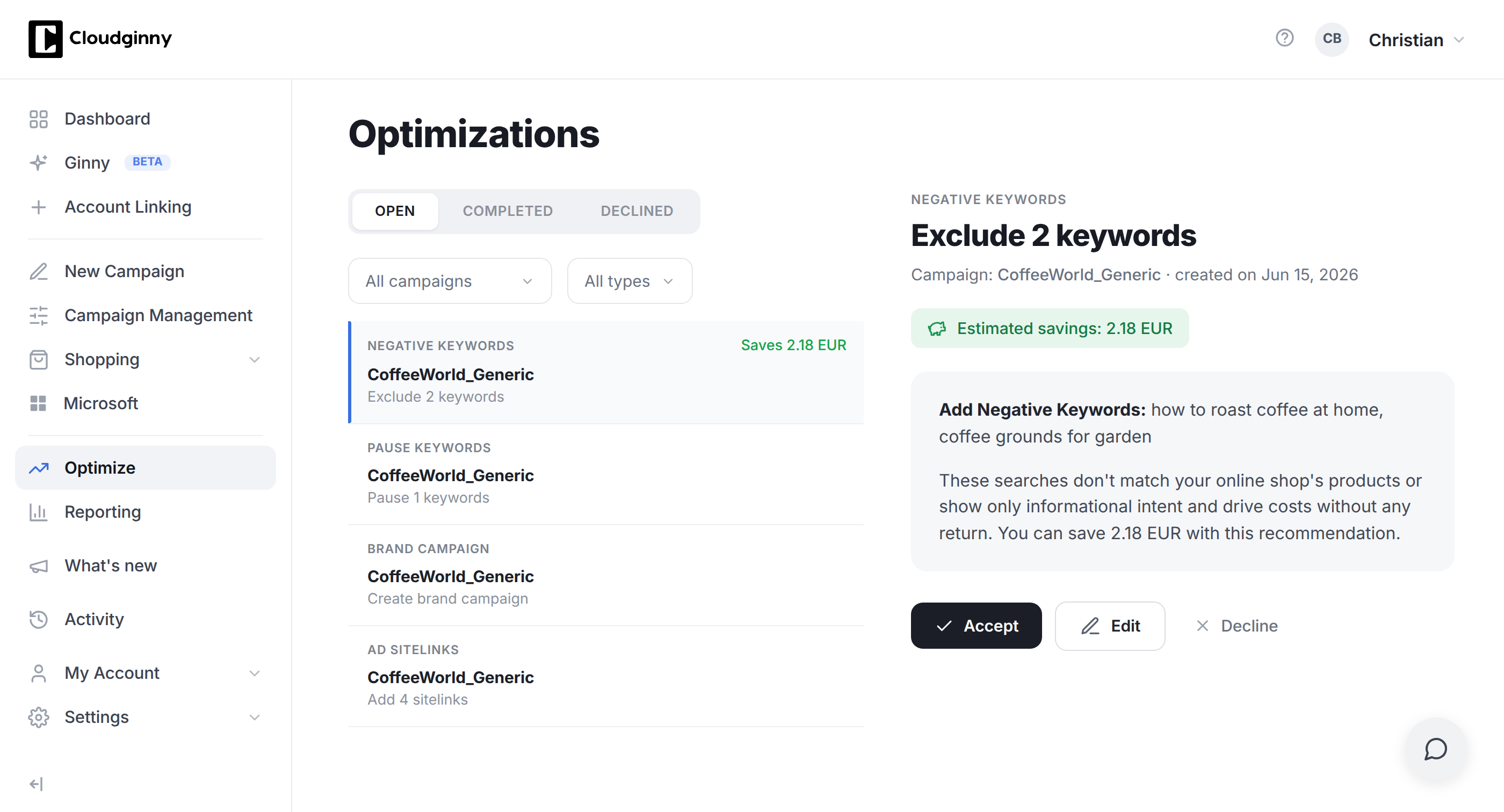
Ginny takes the opposite approach. Her suggestions are based on your revenue and not on the optimization score, each one comes with a rationale and estimated savings, and nothing is implemented until you approve it. Merchants accept a good 80 percent of these suggestions.
Every suggestion comes with a rationale and estimated savings. Nothing changes until you click “Accept”. Screenshot: Cloudginny
Optimize yourself, agency or AI agent?
It depends on your time and your budget. Optimizing yourself costs no fee, but it takes discipline: search terms once or twice a week, a daily look at disapprovals and budgets, and the patience to leave bid targets alone for two weeks. With an agency, the fee for this is usually between $800 and $4,000 a month, and many charge 8 to 15 percent of the ad budget instead. According to our comparison Google Ads agency vs. tools, that only pays off with larger budgets.
Optimize yourselfNo fee, but fixed times: search terms once or twice a week, disapprovals and budgets daily.
AgencyUsually $800 to $4,000 a month or 8 to 15 percent of the ad budget.
AI agent Ginny149 to 699 US dollars a month, approvals in about 15 to 30 minutes a week.
An AI agent like Ginny takes over the routine from this article. She checks search terms, budgets and disapprovals daily, sticks to these rest periods and submits every change to you for approval. In our experience, our customers need about 15 to 30 minutes a week for the approvals. Depending on ad spend, Ginny costs 149 to 699 US dollars a month, without a setup fee. The tiers are on the pricing page.
Hand the routine from this article over to Ginny
Ginny checks search terms, budgets and disapprovals every day and submits every change to you for approval.
Frequently asked questions about Google Ads optimization
How much does it cost to have Google Ads optimized?
For ongoing management, agencies usually charge between $800 and $4,000 a month or a share of 8 to 15 percent of the ad budget. Slimmed-down packages with a few working hours start at about $300 to $500. A one-off audit typically costs $800 to $3,000, and you have to implement the changes yourself afterwards. Depending on ad spend, an AI agent like Ginny costs 149 to 699 US dollars a month. Our guide Google Ads costs works out what the clicks themselves cost.
How long does it take for an optimization to have an effect?
Excluded search terms save money from the next auction. For changes to bid strategy or target, the learning period lasts up to seven days according to Google, and you should evaluate the result after two weeks or two conversion cycles at the earliest, whichever is longer.
How many conversions do I need before setting a target ROAS?
For Search and Shopping campaigns, Google requires at least 15 conversions in 30 days. We only set the target from 15 to 30 conversions, and at first cautiously at the level of the previous ROAS, provided it's above your break-even.
Should I turn off auto-applied recommendations?
For everything that affects budget, bids or keywords, yes. Check under Recommendations which ones are active, and in the change history who turned them on. You can still accept individual recommendations manually after checking them against your numbers.
What's the difference between optimization score and Quality Score?
The optimization score estimates as a percentage how well your account is set up from Google's point of view. Quality Score rates individual keywords in Search campaigns on a scale of 1 to 10 based on expected click-through rate, ad relevance and landing page. Both are diagnostic values, and neither measures your revenue.
Can I optimize Google Ads without an agency?
Yes. You can implement the five levers from this article yourself if you set fixed times for them. If you want to optimize a Google Ads campaign but don't have that time, you can hand the routine over to an AI agent and keep the decision through the approval.
Christian Beeking is co‑founder of Cloudginny, the AI agent for automating Google Ads in e‑commerce. Before Cloudginny, the team managed more than 100 million euros in Google Ads budget for brands such as MediaMarkt, Cisco and Bose, and has now poured that knowledge into Ginny. Cloudginny is an official Google Partner, a WebStollen partner and part of the German Accelerator.
A Google Shopping agency only pays off from around $7,500 to $10,000 in monthly ad spend, and the feed tool, CSS fee and setup come on top of its fee. Most shops spend far less. This article covers what a Shopping agency really costs, what’s behind the promised 20 percent CSS savings, how to spot a bad offer and when an AI is enough for ongoing maintenance.
In December, every delivery promise counts, and Google calculates the delivery date for Shopping from your data. Because Google counts Christmas Eve and New Year's Eve as normal business days, it easily produces dates no carrier can keep. This article covers the 2026 shipping deadlines, how Google calculates the delivery date and what to change in Merchant Center through January.
For most online shops, Google Ads is the first paid channel. Yet the usual explanations only say what Google Ads is, not what a click really costs or where beginners lose money. This article explains the auction, the ad types that matter, the role of Merchant Center and the costs, with real figures from merchant accounts and the five most expensive mistakes to avoid at the start.