Google Shopping Ads on Black Friday 2026. The guide
Christian Beeking
Co-Founder, Cloudginny
September 7, 202610 min read
As of September 4, 2026, written for the 2026 season.
On Black Friday, most of the outcome for Shopping Ads is decided before the auction even starts. You can still rescue a text ad on the day itself, but you cannot rescue a feed with wrong prices: your products drop out of the auction exactly when traffic is at its most expensive and most valuable. This guide walks through the Shopping side of Black Friday end to end, from picking the range to strikethrough prices and Merchant Center promotions, right down to what you are better off not touching during Black Week. The dates: in 2026, Black Friday falls on November 27 and Cyber Monday follows on November 30.
What runs differently on Black Friday than the rest of the year
Three shifts shape the promotion days. Click prices go up, with agency reports citing increases of 30% to 50%, because every retailer pushes more budget into the same ad space at the same time. Shoppers weight things differently: on promotion days, price and shipping cost matter more than product detail, and both of those sit right there in the ad on Shopping. So your competitive edge is built in the feed, not in the bid field.
And the days are not worth the same. Across retail as a whole, Cyber Monday is the bigger revenue day, but in advertising terms Black Friday comes out ahead. So if you are splitting your powder across two days, put the weight on the Friday.
On lead time you will read everything from one week to six, and the contradiction resolves itself as soon as you separate the tasks: strategy, budget ramp-up and learning phases need the four to six weeks Google itself quotes. Campaigns and ads should be in place two weeks out, because disapproved ads and products need time to fix. And Merchant Center promotions need at least a week because of the review process. Here are the deadlines at a glance. Two of them are hard and cannot be made up later:
Deadline
What is due
Where
Already running
Base price history for strikethrough prices: the base price must have applied for 30 of the last 200 days. Cannot be made up
ERP, pricing strategy
From Oct 15
Earliest start: promotions with “Black Friday” or “Cyber Monday” in the title may only be live from October 15 to December 15
Merchant Center
By end of Oct
Range and discount levels final, reference prices under the German price indication ordinance in place
ERP
By mid-Nov
Promotions created and checked for approval after 24 hours, budgets raised in steps, assets built
Merchant Center, Google Ads
Nov 23 to 30
Black Week: seasonality adjustment for a maximum of 1 to 7 days, no more structural changes
Google Ads
By Dec 15
Latest end for Black Friday and Cyber Monday promotions. Hard window
Range first: which products belong in the promotion
The most common planning mistake is “20% off everything”. As a reminder of what we have measured across our own client accounts: only a good third of approved products get served at all, and Google picks them along the likelihood of conversion. A blanket promotion therefore discounts mostly products that never see an impression, and gives away margin on the bestsellers that would have sold anyway.
Products that belong in the promotion have three properties:
Enough margin to carry both the discount and the higher click costs.
Enough stock for a rush lasting several days.
A clean base price history, so the strikethrough price is allowed to show at all.
What belongs out: items with tight stock (a sold-out promotion product burns click budget and creates frustration), fixed-price items without price history, and anything whose margin cannot take the double pressure of a discount and an expensive click. With tight stock there is another rule: bid defensively rather than let the warehouse be clicked empty by Friday lunchtime. And one recommendation that runs through every practitioner report: simple, clear discounts instead of complicated tiers that neither Google nor the customer grasps at a glance.
Feed: price and availability have to match the product page
Google continuously checks whether price and availability in the feed match the product page, and disapproves products when they diverge. In normal operation this is a side issue: in our feed analysis the disapproval rate sat below one percent at the median. But when it hits, it hits by the category, and a discount campaign is the classic trigger. The product page flips to the promotional price on the stroke of midnight, the feed only syncs every 24 hours, and for a few hours hundreds of prices disagree. The result is disapprovals on the morning of the promotion.
The countermeasures: put promotional prices into the feed as sale_price with a start and end date, so Google switches at the right moment itself instead of the feed and the shop racing each other overnight. Raise the sync frequency for the promotion period. Most ERP systems can refresh the feed several times a day, and for prices there are automatic price updates via structured data on the product page as a safety net. And during the promotion week, check the Merchant Center diagnostics first thing in the morning, not at midday, because every hour without your bestsellers costs real revenue on those days.
Setting up discounts: Merchant Center promotion, promotion asset, or both
A discount on Google Shopping is not one single switch. There are three separate layers, and maximum visibility only happens when all three work together.
1
sale_price in the feed
It lowers the advertised price and can trigger the strikethrough price label, more on that in a moment.
2
Merchant Center promotion
In Merchant Center this feature is called Merchant Promotions. It attaches the “special offer” label to your Shopping ads, with discount text and an optional code. A code is explicitly not required.
3
Promotion assets
In the campaigns themselves. They show the discount underneath text ads as well, including a countdown to the end of the promotion.
On the second layer, three things decide whether it works: the promotion_id in Merchant Center has to match the one in the feed exactly, otherwise the promotion is not assigned to any product. The promotion belongs in the account at least a week before the date, and after 24 hours you should check whether it has been approved, because if it hangs longer, only support can help. And for Black Friday and Cyber Monday promotions, that hard window from October 15 to December 15 applies. If Merchant Promotions has never been used in your account, the feature sometimes has to be enabled first, and that takes time too. The formal requirements for promotions are set out in Google’s promotions policies, and Google describes the run-up to major sales events in Prepare for big shopping events with sale prices and promotions.
Maintaining all three layers by hand across your ERP, Merchant Center and Google Ads is exactly the kind of legwork that gets left undone in October. That is why Ginny sets promotions up by chat for our customers: create Google Shopping discounts by chat.
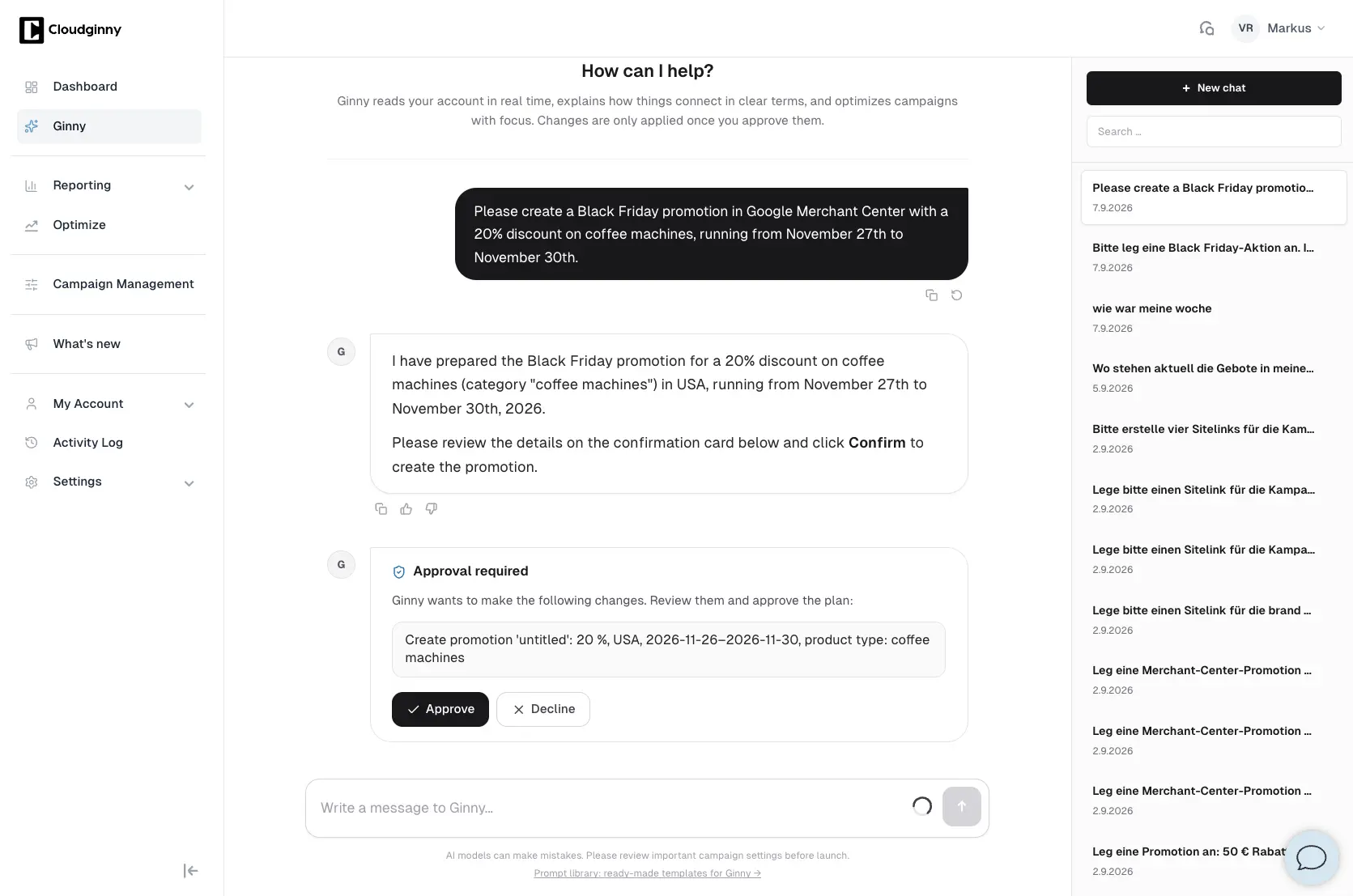
One sentence in the chat covers the discount, the category and the period. The promotion is only created once you confirm it on the approval card. Screenshot from the German interface.
The strikethrough price on the product: the rules
The crossed-out before price on a Shopping ad is the strongest visual lever of the whole promotion, and Google ties it to clear conditions: the promotional price has to be between 5% and 90% below the base price, and the base price must have applied on at least 30 of the last 200 days, which do not have to be consecutive. Both conditions are spelled out in Google’s help page on sale price annotations. If you move your prices weekly all year round, you may not have a valid base price at all, and if you raise it shortly before the promotion, certainly not.
The one you cannot make up later
That is why this deadline sits in the table above as impossible to make up: the price history for November is created in the summer.
Worth getting straight, because it often gets confused: meeting the strikethrough conditions produces the crossed-out price display, sometimes with a percentage, but no “special offer” label. That label comes exclusively from the Merchant Center promotion in the layer before. Both together, strikethrough price plus offer label, is the full build. And independently of Google's rules, the German price indication ordinance applies: the reference price used in discount advertising must be the lowest price of the last 30 days. That is a separate, legal layer alongside Google's conditions.
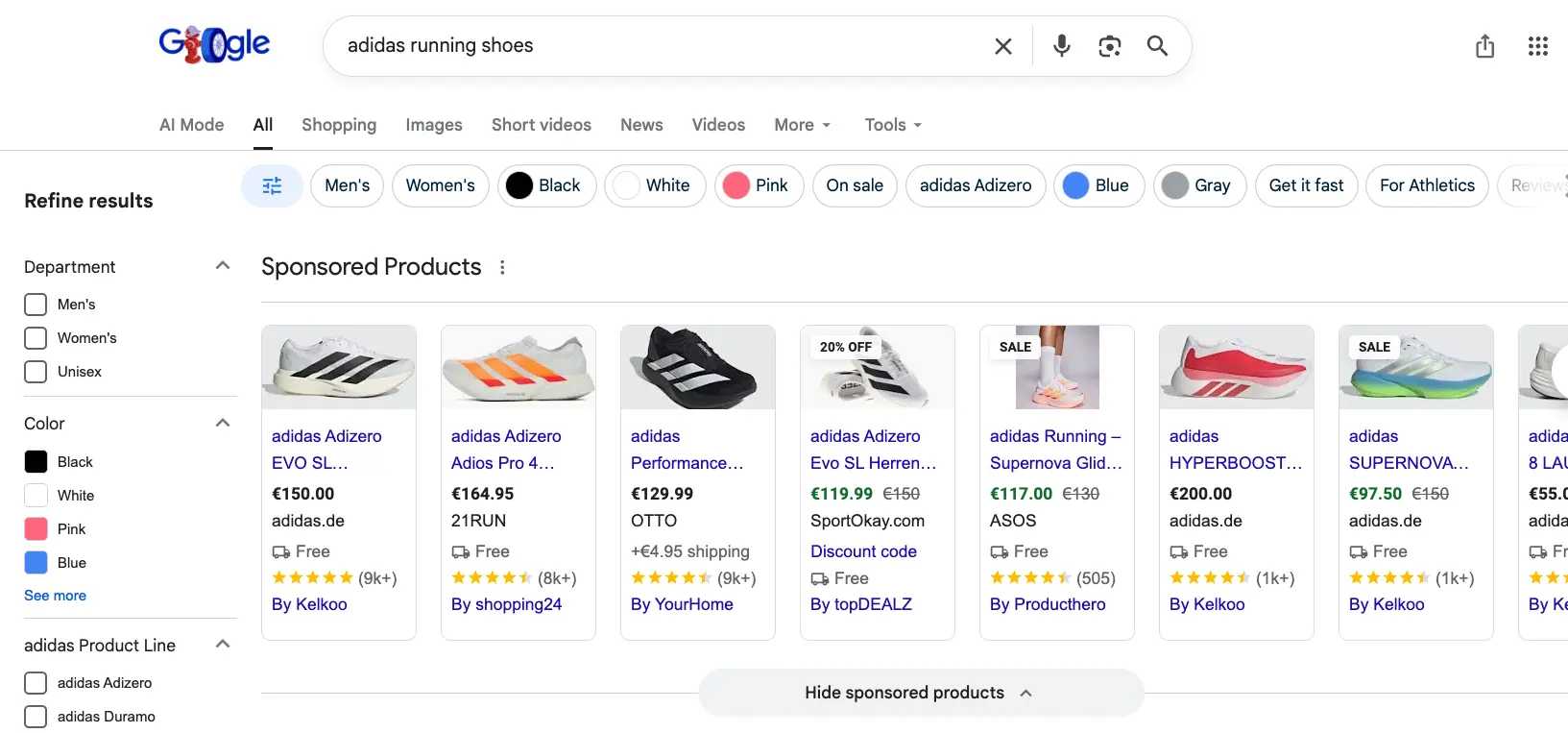
Several ads carry a SALE badge and the crossed-out before price, which comes from the sale_price in the feed alone. The fourth product also shows “Discount code” underneath: that label is the Merchant Center promotion on top, and it is the difference between the two layers.
Black Week itself: budget, bids and steady hands
For budgets, agency reports quote two to three times the normal level for Black Week and three to five times for Black Friday itself. The order of magnitude is plausible, but more important than the multiplier is how you get there: in weekly steps from mid-October, so the bidding automation grows with the budget instead of being surprised by a doubling on the promotion weekend.
On target ROAS, reach for the calculator before you lower anything. The discount squeezes your margin, and as margin falls, the ROAS you need to break even automatically rises. So anyone who lowers the target for the promotion on top of that pays for the extra reach twice out of the same margin. For customer acquisition and clearing stock that can still work out, it just needs to be a decision rather than a reflex. For the demand peak of the promotion days, seasonality adjustments are the right tool, and only there: they are designed for periods of one to seven days, not for the whole of November. If you want to run dedicated promotion assets, create separate asset groups in Performance Max rather than rebuilding the existing ones.
And the most important rule of the week itself: stop rebuilding things. Every new structure sends the campaign back into its learning phase, and it will then go through that phase on the most expensive clicks the year has to offer. How to keep optimising PMax without giving up control: steering Performance Max with Ginny.
After the promotion: the way back is just as error-prone
The disapproval risk from the start of the promotion repeats itself at the end, mirrored: the product page jumps back to the regular price, the feed still holds the promotional price, and once again prices disagree. With a properly maintained sale_price end date this sorts itself out, without one the way back has to be timed just as carefully as the way in. After that: remove seasonality adjustments, wind budgets down in a controlled way rather than abruptly (the Christmas season carries on until the shipping deadlines), clear out expired promotions and assets, and document the search terms and winning products from the promotion days. That is the data foundation that stops your 2027 planning from starting at zero again.
Frequently asked questions about Shopping Ads on Black Friday
When can I create Black Friday promotions in Merchant Center?
Promotions referring to Black Friday or Cyber Monday may only be live between October 15 and December 15. You should create them at least a week before the promotion starts so the review process can run, and check the status after 24 hours.
Why is Google not showing my strikethrough price?
Usually one of the two conditions is broken: the discount has to be between 5% and 90%, and the base price must have applied on at least 30 non-consecutive days out of the last 200. The most common case in practice: the price was raised shortly before the promotion, which leaves no history.
Do I need a discount code for Merchant Promotions?
No. Merchant Center promotions work without a code as well, the discount can sit directly in the price. What matters is that the promotion_id matches exactly between Merchant Center and the feed.
How much more budget do I need for Black Week?
Agency reports quote two to three times for the week and three to five times for the promotion day itself. More important than the multiplier is the ramp: raise it in steps from mid-October so the bidding automation learns along the way, instead of jumping on the day.
What matters more on Black Friday: the bid or the price?
The price. On promotion days shoppers weight price and shipping cost more heavily than product detail, and both sit right there in the ad on Shopping. A competitive promotional price with a visible strikethrough and an offer label beats any amount of bid fine-tuning.
Christian Beeking is co‑founder of Cloudginny, the AI agent for automating Google Ads in e‑commerce. Before Cloudginny, the team managed more than 100 million euros in Google Ads budget for brands such as MediaMarkt, Cisco and Bose, and has now poured that knowledge into Ginny. Cloudginny is an official Google Partner, a WebStollen partner and part of the German Accelerator.
For most online shops, Google Ads is the first paid channel. Yet the usual explanations only say what Google Ads is, not what a click really costs or where beginners lose money. This article explains the auction, the ad types that matter, the role of Merchant Center and the costs, with real figures from merchant accounts and the five most expensive mistakes to avoid at the start.
Shopware 6 has everything you need for Google Shopping, but nobody explains it in one piece. The docs cover the product comparison, plugin pages sell extensions, and the forum is missing half the tracking setup. This guide walks you through the whole route: linking the accounts, a feed without a plugin using a Twig template to copy, conversion tracking from Shopware 6.7, a Standard Shopping start and weekly upkeep.
Search for "Google Ads audit" and what you mostly get is offers: agencies that will examine your account for free, and a contract at the end. That does not answer the question underneath: what is actually being checked, how much of it can I do myself, and what does the rest cost? This article walks through the nine areas of an audit, says for each one where the money typically leaks, and attaches a checklist you can tick off.