Google Shopping for Retailers: Costs, Requirements and Opportunities
Christian Beeking
Co-Founder, Cloudginny
August 13, 202612 min read
Product images with prices, right at the top of Google Search: that’s Google Shopping, for most online shops the advertising channel that sits closest to the buying decision. People who search there usually want to buy and are only comparing where. Still, many retailers don’t dare to start, or drop out early, because it’s unclear what the channel costs, which hurdles their own shop has to clear and how much work really comes after launch.
This guide answers exactly that: how it works, costs including a sample calculation, requirements, the technology behind it and what Google set in motion in 2026 with the Universal Cart.
What is Google Shopping and how does it work?
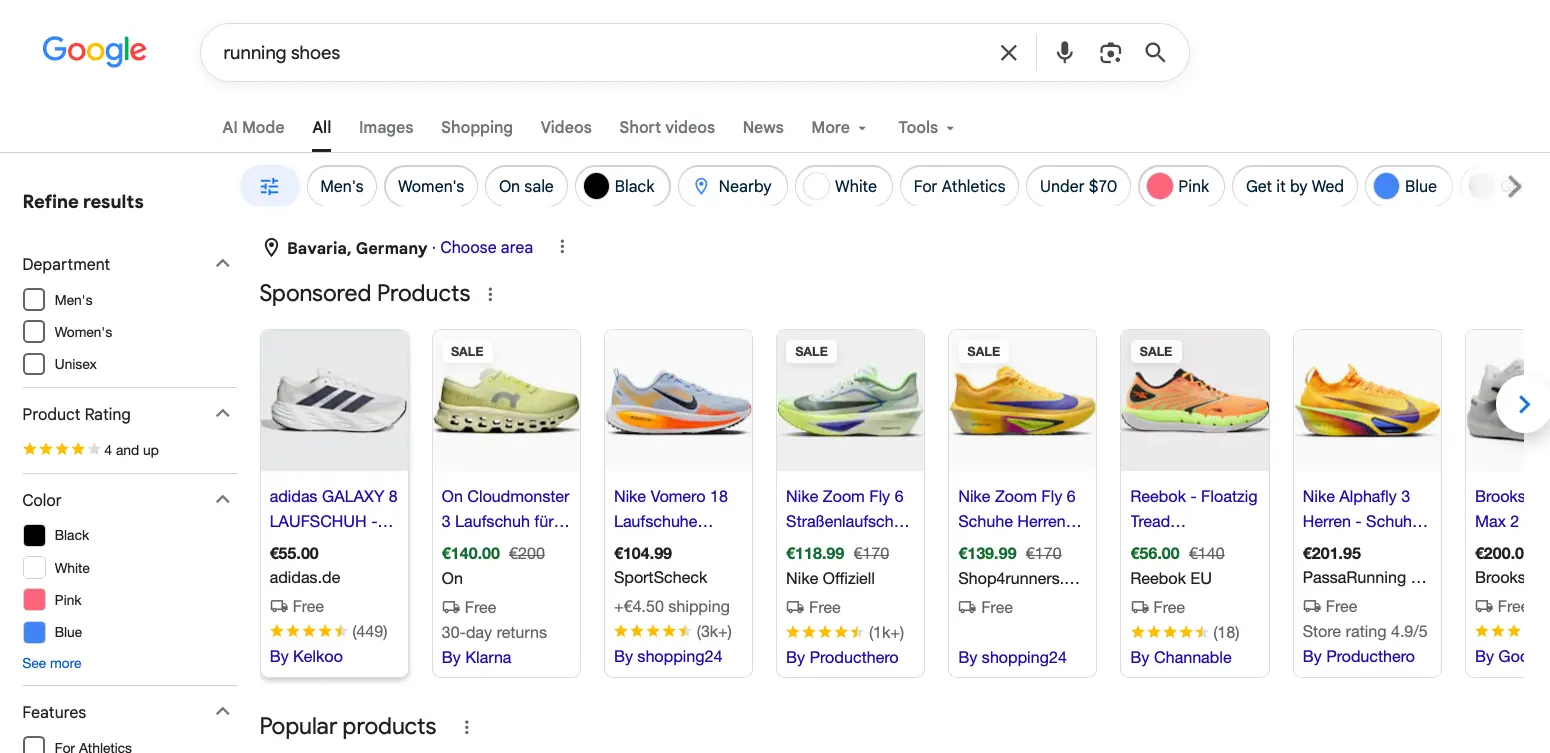
Google Shopping is Google’s product search, showing items from online shops with image, price and merchant name directly in the search results. Retailers submit their product data for this through the Google Merchant Center. Visibility comes in two forms: free product listings and paid Shopping Ads, which are managed through Google Ads and billed per click.
How your products can appear in Google’s product search: with image, price and merchant right in the result.
Unlike classic text ads, with Google Shopping you don’t book keywords. Google decides which search queries your items appear for based on your product data: title, description, brand, GTIN, category and price are matched against the query. The quality of your product feed is therefore the most important lever for visibility, even before budget.
Your products are shown in many places: at the top of regular search as a product carousel, in the Shopping tab, in image search, on YouTube and increasingly in AI surfaces like Gemini and AI Mode. When someone clicks a product, they land directly on your product page. Google Shopping works more like a shop window than a marketplace: the order runs through your shop, and the customer relationship and data stay with you.
Free listings vs. paid Shopping Ads: the difference
Since 2020 there have been two ways into product search, and most retailers use both in parallel.
Free product listings
As soon as your product feed is in the Merchant Center and meets the policies, Google can show your products for free, above all in the Shopping tab and image search. Google has gradually widened the reach of these listings over the years, most recently to AI surfaces too. You pay nothing for them. In return, you can set neither budget nor bids and have no influence over which products are shown preferentially. Placement depends solely on data quality and relevance.
Paid Shopping Ads
These are the ads labeled “Sponsored” in the most prominent positions, right at the top of search and in the Shopping tab. They run through a Google Ads account, you pay per click and you steer budget, ROAS targets and campaign structure yourself. Only here does reach become plannable.
In practice, free listings are the baseline every shop should take along, because apart from feed maintenance they cost nothing. Reliable revenue, though, comes from the paid format: the lion’s share of clicks goes to the ad slots, especially for queries with clear purchase intent.
What opportunities does Google Shopping offer retailers?
The most important reason for the channel is purchase intent. Someone who types “men’s trail running shoes size 10” is close to buying and is only comparing offers. This late in the buying process you can hardly reach people anywhere else.
On top of that comes traffic quality. People see image, price and merchant before they even click. Anyone who then clicks knows what to expect, so conversion rates are correspondingly higher than with text ads.
The channel is interesting for smaller shops too, because delivery is driven by product data, price and relevance. A specialized niche shop with a clean feed can therefore stand right next to big players that spend a hundred times as much per month.
And once a campaign runs profitably, you scale it up in a controlled way through the budget. With SEO you wait months for results; here you adjust within weeks.
The barrier to entry is lower than its reputation. Shopping campaigns can be set up in a few minutes today, with AI support even in a chat: create Google Shopping campaigns with Cloudginny. Our case study with Nähplatz.de shows what that looks like in practice.
What does Google Shopping cost?
Free listings cost nothing. With paid Shopping Ads you pay per click; there is no minimum budget or setup fee from Google. Click prices are well below those of classic search ads, often around half, which is why the format works even with smaller budgets.
Click prices: what to expect
CPC depends on your range, competition and season (e.g. Black Friday). Instead of generic industry lists, here are the figures from our own client accounts:
Metric
Value
Median CPC
€0.42
Middle 50% of accounts
€0.27 to €0.57
Full range
€0.12 to €1.73
Data basis: e-commerce client accounts in the DACH region, Standard Shopping and Performance Max campaigns, 08/2025 to 07/2026, over 1.8 million clicks combined. PMax is included because for most shops it is the standard way to run Shopping ads today.
So half the accounts sit between 27 and 57 cents per click, and even the most expensive account stays under €1.80.
Sample calculation: €1,500 monthly budget
We build the calculation from the median values across our client accounts:
Metric
Value
Monthly budget
€1,500
Avg. CPC (median)
€0.42
Clicks
~3,570
Conversion rate (median)
1.9%
Orders
~68
Avg. cart (median)
€66
Revenue
~€4,480
ROAS
3.0
A ROAS of 3.0 means every euro of ad spend brings in €3 of revenue. For context: the median ROAS across our client accounts is 3.8, with the middle half of accounts between 1.7 and 7.8.
Whether a value is enough is decided by your margin. Break-even ROAS is 1 divided by your gross margin: with a 40% margin you need at least 2.5, and then the example shop makes money. With a 25% margin you need 4.0 and would have to sharpen things up. Work out your break-even before you start and set it as the target in the campaign.
Also plan for the learning phase. In the first two to four weeks the algorithm gathers conversion data and results fluctuate. Whoever pulls the plug after ten days because the ROAS isn’t right yet usually gives up too early.
Requirements: what your online shop has to meet
Google doesn’t admit every shop. Before you start, you should tick off these points:
A complete legal notice (Impressum) and reachable support, because Google checks the shop’s trustworthiness
Transparent return and shipping terms that match the details in the Merchant Center
HTTPS, at the latest in checkout
A working online checkout with common payment methods and final prices including VAT
Exactly matching prices in feed and shop; price discrepancies are among the most common reasons for disapproval
A permitted product range; categories like medicines, alcohol or weapons are restricted
The product feed is a structured list of all your products with the required attributes: title, description, image URL, price, availability, GTIN, brand and category. Shop systems like JTL, Shopify or Shopware generate this feed automatically, natively or via a plugin, and should refresh it daily so that prices and availability stay correct.
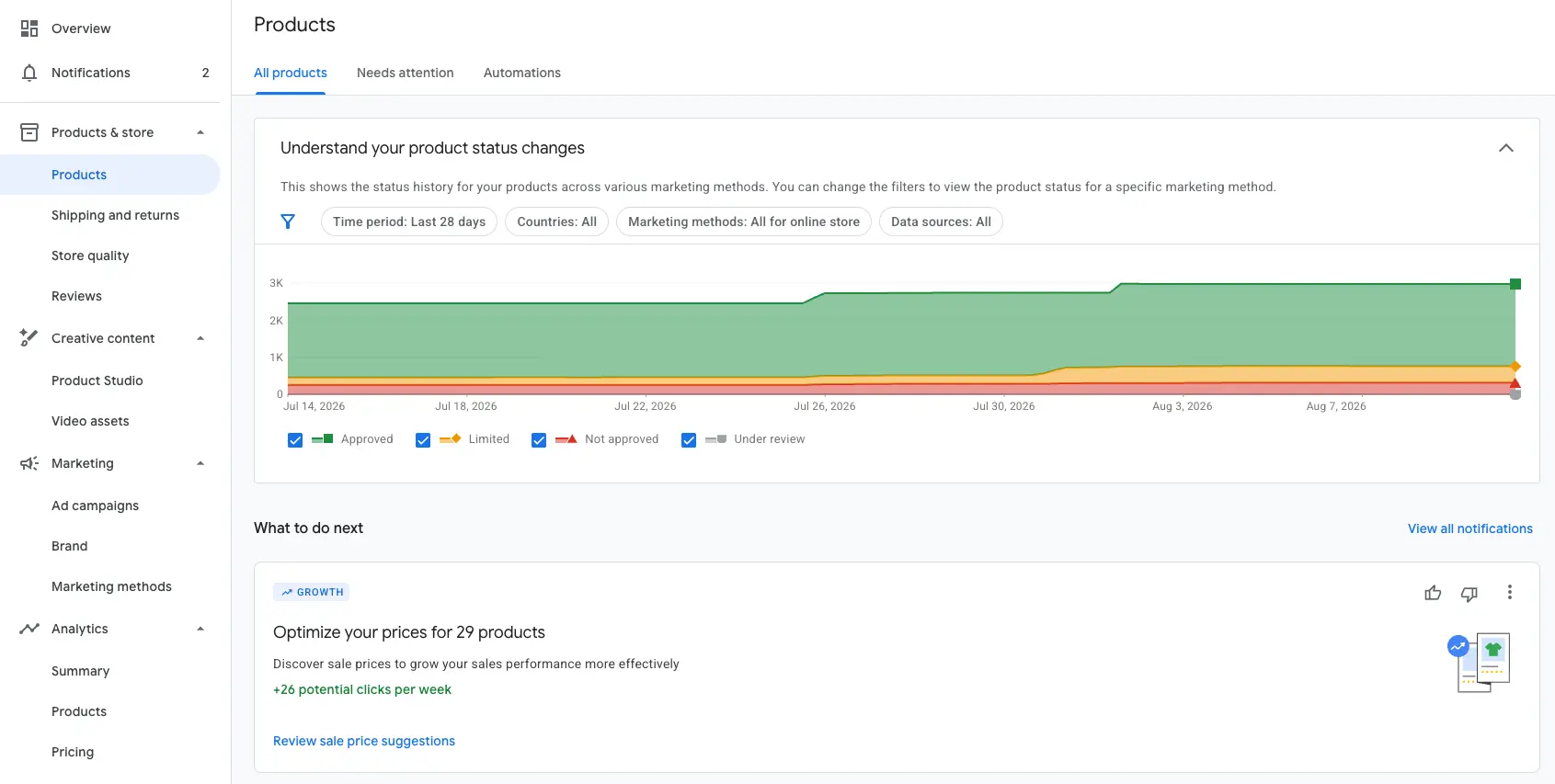
In the Merchant Center, Google checks every item against the policies before it is shown.
In practice, success hinges on two things. The first is data quality, above all the product title. “Women’s running shoe Gel-Nimbus 27, size 39, blue” earns more relevant impressions for the same budget than “Gel-Nimbus 27”, because Google matches the queries against the title.
How much is left on the table here is something we see regularly at Cloudginny: in almost every account we take over, there are zombie products. These are items that sit in the feed and are approved, but that Performance Max hasn’t shown for months, usually because of weak titles or patchy product data.
The second point is policy compliance. Google checks every item automatically. Missing GTINs, differing prices or dead landing pages lead to the disapproval of individual products, and disapproved products simply aren’t shown at all. We’ve broken down the most common causes and their fixes here: Products disapproved in the Merchant Center: the top 3 reasons.
New in 2026: Universal Cart and agentic checkout
At Google I/O in May 2026, Google presented the next rebuild of product search: the Universal Cart, a cross-merchant shopping cart that works across Google’s services. Users add products from search, from a chat with Gemini, from YouTube or from Gmail into a shared cart and complete purchases across several merchants in one go.
Technically this is based on the Universal Commerce Protocol (UCP), an open standard Google developed together with Shopify. Through UCP, AI agents read product data, check availability and trigger checkouts. On top of that comes the Agent Payments Protocol (AP2), which secures payments made by agents: users define which brands, products and budgets an agent may buy, and only once the criteria are met is the transaction executed.
For retailers in Germany there is no urgent need to act. The UCP checkout is launching in the USA and will first be extended to Canada, Australia and the UK; it isn’t live here yet. Still, it’s worth knowing the direction of travel. Even in the agentic checkout you remain the merchant of record; the order, fulfillment and customer data still sit with you. What shifts is the path to purchase: AI agents compare structured product data instead of category pages. A complete, up-to-date feed was always half the battle for Shopping; for Universal Cart it becomes a basic requirement. Whoever keeps it clean today will have to retrofit almost nothing for the agentic world.
We’re keeping an eye on the topic and will update this section as soon as there’s news for the German market.
Ongoing effort: feed maintenance, bids and how automation helps SMBs
After the setup, the real work only begins. Ongoing operation typically includes:
Maintaining the feed: fixing disapproved products, sharpening titles, adding new products
Checking search terms and excluding irrelevant queries
Adjusting ROAS targets and budgets to margin and season
Analyzing which products carry the revenue and which just burn money
Realistically that’s several hours a week if you take it seriously. This is where many smaller shops drop out again: almost everyone manages the setup, but the ongoing maintenance alongside daily business gets left undone. An agency takes it off your hands but costs monthly retainers that rarely pay off with smaller budgets.
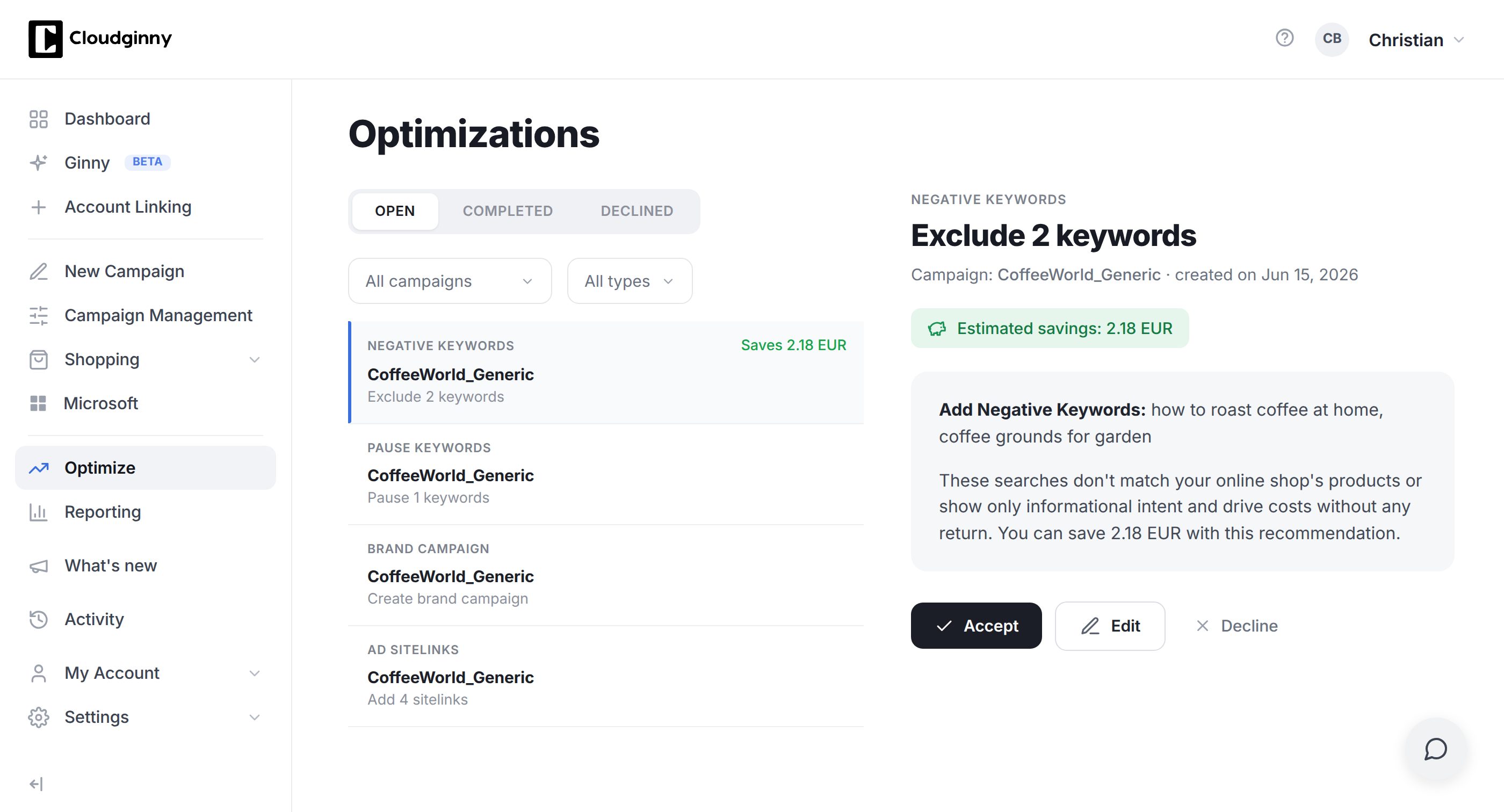
AI automation takes over the ongoing maintenance and suggests changes; the approval stays with you.
The third option is AI automation. Tools like Cloudginny take over the daily analysis, propose optimizations with a concrete euro impact and carry them out after your approval. Control stays with you and most of the manual effort falls away.
Frequently asked questions about Google Shopping (FAQ)
Is Google Shopping free?
Partly. Free product listings have existed since 2020 and appear mainly in the Shopping tab and image search. The prominent ad slots at the very top of search are paid Shopping Ads, billed per click. For plannable revenue you need both in practice.
What’s the difference between Google Shopping and Google Ads?
Google Ads is the advertising platform through which all Google ads run. Google Shopping is a format within that platform: product ads with image and price that are based on your product feed rather than on booked keywords.
How much budget do I need to start?
There is no minimum budget. So the algorithm gets enough data to learn, we recommend at least €500 to €1,000 per month. Below that the learning phase takes very long and results fluctuate a lot.
What does a click cost on Google Shopping?
In our client accounts the median is €0.42 per click, with half the accounts paying between €0.27 and €0.57. Depending on range and competition, the span reaches from €0.12 to €1.73.
How quickly will I see results?
First clicks usually come within a few days of going live. Reliable statements about profitability are possible after four to six weeks, once the algorithm has gone through the learning phase.
Do I really need a Merchant Center account?
Yes. The Merchant Center is the prerequisite for Google Shopping, whether free or paid. That’s where your product data sits and where Google checks policy compliance.
Is Google Shopping worth it for small shops too?
Especially for small shops. Click prices are more moderate than with text ads, and delivery is driven by product data, price and relevance. Niche shops with a clean feed compete directly with large providers here.
What’s the difference between Standard Shopping and Performance Max?
Both are campaign types for Shopping Ads. Standard Shopping gives you more manual control over bids and delivery. Performance Max is Google’s automated campaign type, which additionally serves placements on YouTube, Display and Gmail and is the standard for most shops today.
What is the Universal Cart?
The Universal Cart is Google’s new cross-merchant shopping cart, presented in May 2026. Users collect products from search, Gemini, YouTube and Gmail in one cart and check out with several merchants at once. In Germany the feature isn’t available yet; the rollout is running first in the USA, Canada, Australia and the UK.
Christian Beeking is co‑founder of Cloudginny, the AI agent for automating Google Ads in e‑commerce. Before Cloudginny, the team managed more than 100 million euros in Google Ads budget for brands such as MediaMarkt, Cisco and Bose, and has now poured that knowledge into Ginny. Cloudginny is an official Google Partner, a WebStollen partner and part of the German Accelerator.
Ryze AI is the cheaper multichannel autopilot: $89 flat for Google, Meta, TikTok and LinkedIn. Cloudginny is a Google Ads specialist with a German company behind it, Merchant Center depth and an approval model. This comparison puts prices, channels and control side by side, and says plainly where Ryze wins.
Search for Google Ads management software and you land on Optmyzr, Adalysis or Opteo. They are good tools, just built for somebody who already knows Google Ads: a marketer who writes rules and knows what to do with forty improvement suggestions. Most online shops do not have that person. This article explains what the classic platforms actually do, what an AI agent does differently, which model fits when, and what neither of them can do.
Calculating ROAS takes ten seconds: revenue divided by ad spend. Judging it is the real work, because the same ROAS of 4 means profit at one margin and a loss at another. This article gives you the formula, break-even ROAS, real benchmarks from more than 1.8 million clicks, the target ROAS settings that actually matter in Google Ads, and a calculator that shows you in dollars what is left at the end.