Google Merchant Center: The Practical Guide for Online Shops
Christian Beeking
Co-Founder, Cloudginny
September 7, 202610 min read
No Merchant Center, no Google Shopping: every product that shows up on Google with an image and a price has passed through this account first. And yet most merchants only really get to know the tool once something jams, products get disapproved or, in the worst case, the account is suspended. This guide covers both: how the Merchant Center works and, in more detail than usual, what to do when it causes trouble, including the question of what an outage actually costs.
What is the Google Merchant Center?
The Google Merchant Center is the free platform online shops use to send their product data to Google. It is the precondition for products appearing in Google Shopping, both as free listings and as paid Shopping ads. Google checks every product there against its policies and distributes the approved data to Search, the Shopping tab, Image search, YouTube and Maps.
Put differently: the Merchant Center is the data hub between your shop and every Google surface. Whatever does not arrive there, or gets disapproved, does not exist for Google’s shopping world. How that world works from a merchant’s point of view, from costs to opportunities, is covered in our guide to Google Shopping.
How does the Merchant Center work?
A product’s route to Google has four stations.
Your shop system generates a product data feed, a structured list of every item with price, image, availability and further attributes.
That feed lands in the Merchant Center, via an automatic transfer from JTL, Shopify, Shopware and others, via the Content API or, at a push, as a spreadsheet.
Google checks every item automatically against data and policy requirements, continuously comparing feed and product page.
Approved products then get served, organically in the free listings and as paid placements through linked Google Ads campaigns.
Two account details that hardly any guide mentions and that matter in agency and multi-shop setups: each Merchant Center account needs a Google account with a unique email address, and a single user can have access to a maximum of 100 Merchant Center accounts.
What does the Google Merchant Center cost?
Nothing. The account is free, so are the free product listings, and Google charges neither setup nor running fees. The only expensive parts are what hangs off it: clicks on Shopping ads run through your Google Ads budget (what clicks realistically cost is in our guide to Google Ads costs), and ongoing maintenance costs time or money, depending on whether you do it yourself, pay an agency or let a tool do the work. So for a plain start with free listings the maths is: nothing to Google, a clean feed as the entry price.
How do I set up the Google Merchant Center?
The short version, because setup is a topic of its own: create an account at merchants.google.com, add company details plus shipping and returns policies, link your website, transfer the feed. Two steps decide everything that follows.
First, verifying website ownership, because without it Google accepts no products. Three routes lead there: an existing Google Analytics account, Google Tag Manager, or an HTML tag placed in the source code of your home page. Which route is right depends on what already runs on your website, and the Analytics or Tag Manager account has to be managed under the same email address.
Second, the link to Google Ads, because without it not a single Shopping ad runs. The link is initiated in the Merchant Center and confirmed in the Ads account, and only then is your product data available to campaigns.
What product data does Google need?
The feed is the heart of it, and Google requires a handful of mandatory attributes per product: a unique ID, title, description, link to the product page, image URL, price, availability, plus brand and GTIN where they exist. On top of that come category-specific required fields such as size, colour or age group for apparel. The quality of these fields decides your visibility: the title is the single most important relevance signal Google matches search queries against.
One detail with a built-in deadline: product data expires 30 days after the last transfer. A feed that is not refreshed therefore disappears from serving on its own after a month. In practice the update should run daily so that prices and stock levels are correct, which the shop system connectors handle automatically once they are set up properly.
How are my products shown on Google?
Approved products appear in two ways. Free listings are shown by Google mainly in the Shopping tab and in Image search, without you paying for them, but also without any influence on placement. Shopping ads, on the other hand, you book through Google Ads: they sit in the most prominent positions, at the top of Search and in the Shopping tab, you pay per click and you steer budget and goals. Both routes draw on the same feed, which is why every improvement to your product data pays off twice.
Why are none of my products showing on Google?
The question that brings most merchants into the Merchant Center in the first place, and it has two very different answers.
The first one is errors and disapprovals. To make sense of them, the Merchant Center’s level logic helps: problems sit at account, feed or item level. An item issue affects one product, a missing GTIN for instance. A feed issue affects the transfer and therefore many products at once. An account issue takes the whole shop offline. On top of that come three severity levels: notifications are hints, warnings announce consequences, critical errors mean products are not served, and only the latter two call for immediate action.
By far the most common trigger for item disapprovals is a mismatch between feed and product page on price or availability, and a single euro of difference is enough. Typical case: the product page changes the price immediately, the feed only syncs every 24 hours, and in that gap Google disapproves. For context from our own feed analysis across customer accounts: at the median, Google disapproves under one percent of products, so disapprovals are not a blanket problem. But when they hit, they hit by category, because a missing required field rarely affects a single product, and one outlier in our analysis sat at 28 percent of products blocked. The three most common disapproval reasons and their fixes are covered here in detail: Product disapproved in the Merchant Center: the 3 top reasons.
The second answer is one hardly anyone mentions, and it affects more products than all the errors combined: approved does not mean served. A product without a single error is allowed to appear; whether it does is decided by Google along budget and conversion probability. In our customer accounts, at the median only a good third of approved products get any paid impressions at all, and for catalogues above ten thousand products it is only a good tenth. So anyone who sees green ticks everywhere in the Merchant Center and still wonders why half the range gets no clicks does not have an error problem, they have a prioritisation problem, and that is solved in the campaigns, not in the Merchant Center.
From our feed analysis across customer accounts
under 1%of products are disapproved by Google at the median
28%in the outlier account, because one required field was missing
a good ⅓of approved products get any paid impressions at all
a good 1/10is what it drops to for catalogues above ten thousand products
Those bottom two numbers are why green ticks in the Merchant Center on their own say nothing about your revenue.
What happens if the account is suspended?
The worst case announces itself: before suspending an account over policy violations, Google sends a warning email with a deadline to fix the issue, and depending on the violation that is 7 or 28 calendar days, so the widely quoted flat 28 days is not accurate. Anyone who misses that email because it goes to an unread address loses the entire response window, which is why the account contact address belongs on a mailbox somebody reads daily.
If it does come to a suspension, all products go offline, the free listings just as much as the ads. And the damage is bigger than the suspension itself: between fixing the issue, Google’s re-review and campaigns spinning back up, which have to gather data again after the pause, a suspension realistically costs one to two weeks of revenue. That is why the routine check in the next section pays off even for shops where everything is running fine: a suspension is almost always the end of a chain of ignored warnings, not a bolt from the blue.
Merchant Center Next: what changed?
Since 2024, Merchant Center Next has been the standard for all accounts. The interface has become simpler, Google can partly read product data straight from the website, and the performance and price reports are more tightly integrated. The rules of the game, however, have not changed: same required attributes, same policies, same disapproval reasons, just in different places in the menu. So anyone reading instructions from before Next has to find the paths again, not learn the rules again.
What should you check regularly in the Merchant Center?
The honest answer to how much maintenance the Merchant Center needs: not much, but regularly, and with clear priorities.
Weekly, a look at the diagnostics is due: new item disapprovals and their reasons, open warnings at account and feed level, expiring products. During promotional periods that becomes a daily look, because price changes then happen by the hour and every disapproval costs expensive traffic, which stings particularly around Black Friday, see our Black Friday guide for Shopping ads. Monthly, it is worth comparing approval against serving: are the products meant to carry revenue actually running, or are bestsellers idle while slow movers get the budget? And after every price or range change in the shop comes the question of whether the feed picked it up.
For our customers, Ginny takes over exactly this routine: daily checks of the diagnostics, disapproval reasons explained in plain language instead of Google error codes, and concrete fix proposals that you only have to approve.
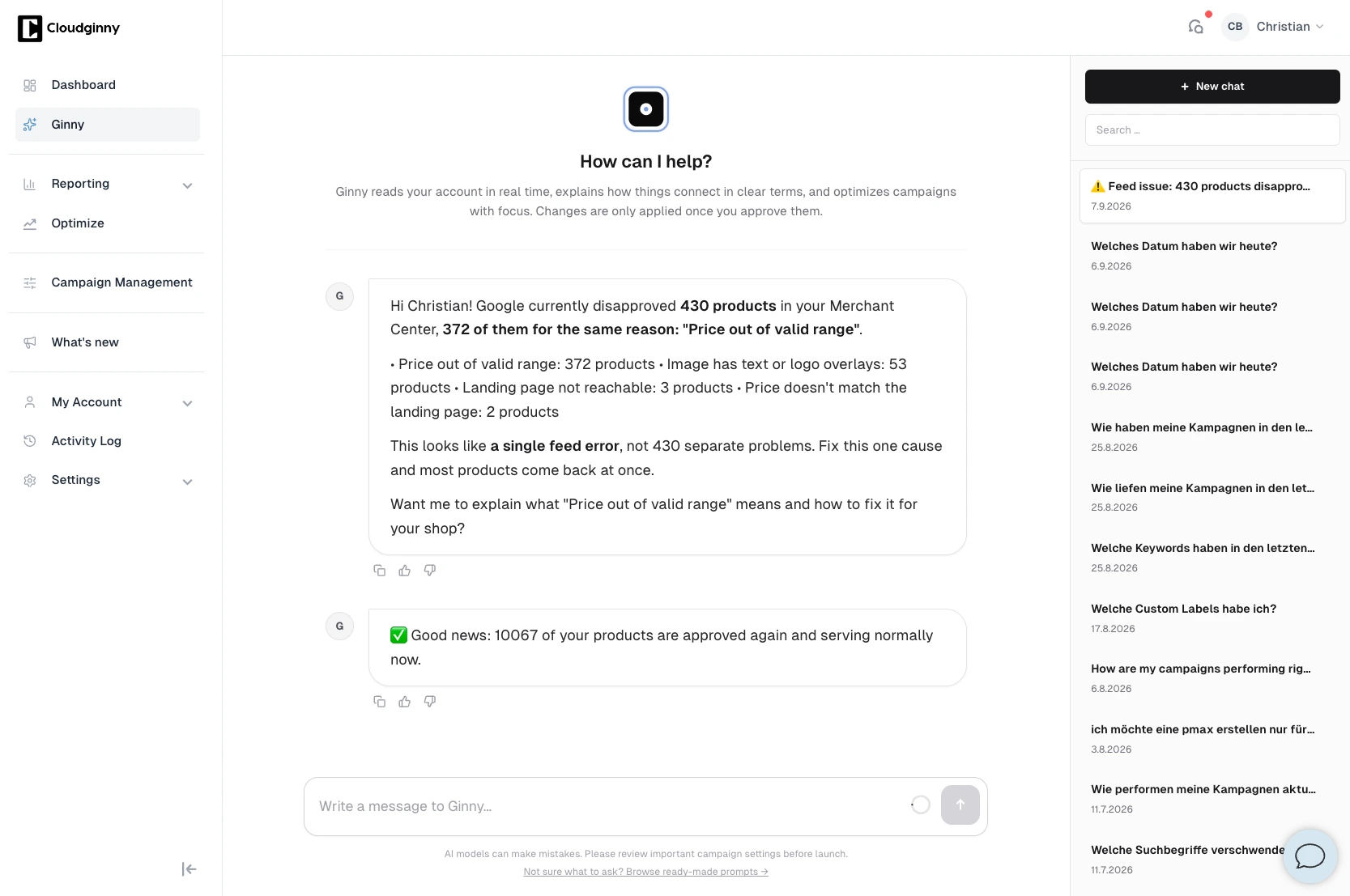
Exactly the case from the section above: 430 disapproved products, but 372 of them from a single cause. Ginny names the reason in plain language instead of a Google error code and proposes fixing that one cause.
How much of this can be automated?
More than most merchants use, but not everything. Feed generation runs by itself through the shop system connector, and Google’s automatic price updates can cushion mismatches between feed and product page by pulling prices from the structured data on the website. Monitoring, diagnostics and fix proposals are handled by tools: Ginny spots disapprovals, names the cause and proposes the fix, which is implemented once you approve it.
What no automation takes off your hands are the fundamental decisions: which products belong in the Shopping range, what the policy topics of your particular range look like, and whether the company details Google’s trust review hangs on are correct. Automation keeps the account clean; building it right is a one-off job.
Frequently asked questions about the Google Merchant Center
What does the Google Merchant Center cost?
The account and the free product listings are free of charge. Costs only arise from Shopping ads, billed per click through Google Ads, and from the maintenance effort, whether that is your own time, an agency or a tool.
Where do I find the Google Merchant Center?
At merchants.google.com, and you log in with a normal Google account. Each Merchant Center account needs a Google account with a unique email address.
What does a business Google account cost?
For the Merchant Center: nothing. A normal, free Google account is enough to register and operate, a paid Google Workspace account is not required. The question usually comes from mixing it up with Google’s office software subscriptions.
How long does the review of new products take?
Usually a few working days, mostly within 72 hours, and longer at peak times. That is why product changes ahead of promotions belong in the account with lead time.
Why were my products disapproved?
The most common reasons are mismatches in price or availability between feed and product page, missing required attributes such as GTINs, and landing pages that cannot be reached. The reason per product is shown by the diagnostics in the Merchant Center.
Does my feed expire?
Yes. Product data expires 30 days after the last transfer. With an automatic daily update through the shop system connector, the question never comes up in practice.
What is the difference between the Merchant Center and Google Ads?
The Merchant Center manages product data and checks it against Google’s policies. Google Ads steers the advertising campaigns, their budgets and bids. Shopping ads need both, linked together: the data from one, the campaigns from the other.
Christian Beeking is co‑founder of Cloudginny, the AI agent for automating Google Ads in e‑commerce. Before Cloudginny, the team managed more than 100 million euros in Google Ads budget for brands such as MediaMarkt, Cisco and Bose, and has now poured that knowledge into Ginny. Cloudginny is an official Google Partner, a WebStollen partner and part of the German Accelerator.
For most online shops, Google Ads is the first paid channel. Yet the usual explanations only say what Google Ads is, not what a click really costs or where beginners lose money. This article explains the auction, the ad types that matter, the role of Merchant Center and the costs, with real figures from merchant accounts and the five most expensive mistakes to avoid at the start.
Shopware 6 has everything you need for Google Shopping, but nobody explains it in one piece. The docs cover the product comparison, plugin pages sell extensions, and the forum is missing half the tracking setup. This guide walks you through the whole route: linking the accounts, a feed without a plugin using a Twig template to copy, conversion tracking from Shopware 6.7, a Standard Shopping start and weekly upkeep.
Search for "Google Ads audit" and what you mostly get is offers: agencies that will examine your account for free, and a contract at the end. That does not answer the question underneath: what is actually being checked, how much of it can I do myself, and what does the rest cost? This article walks through the nine areas of an audit, says for each one where the money typically leaks, and attaches a checklist you can tick off.